
Extrude should apply the direction signaled on the screen when entering a precise distance
When I extrude a face and use the mouse to signal the direction I wish to extrude, the system should use that information when typing in a distance to extrude.
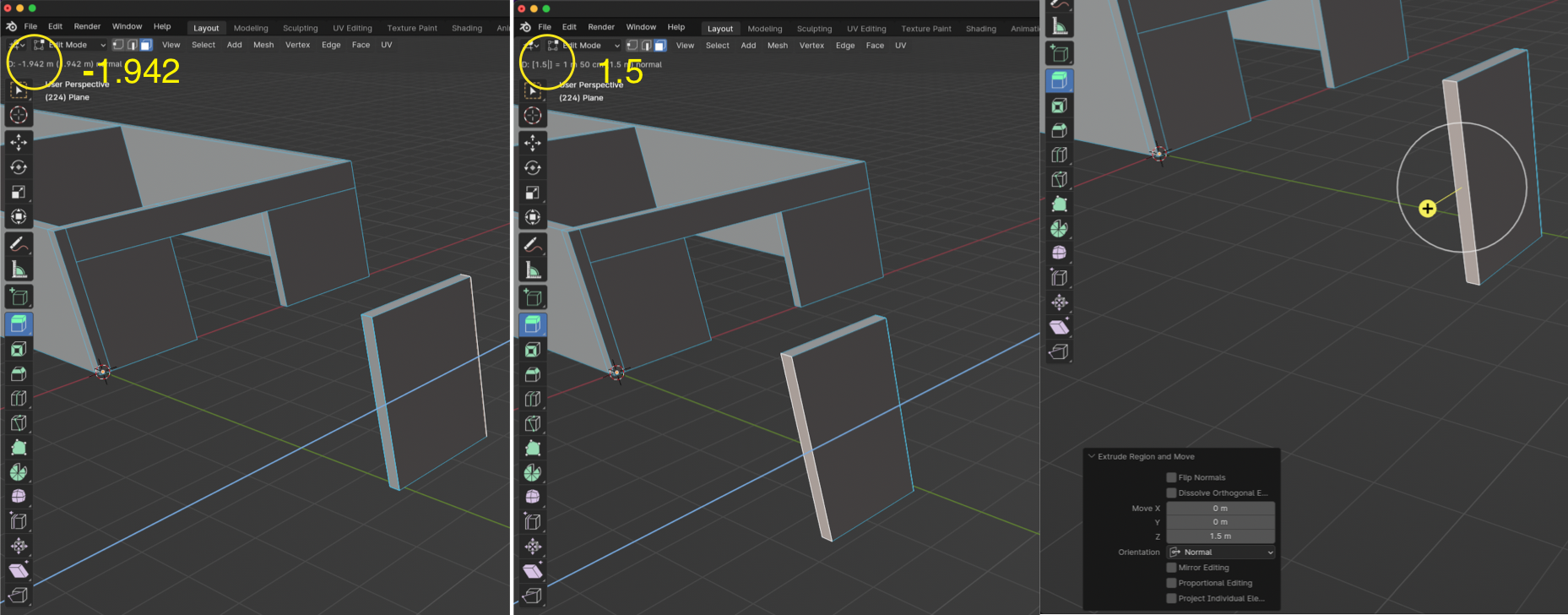
In this example, I use the mouse to indicate the direction I want to extrude which happens to be along the objects Z axis. The system recognizes the axis and shows a negative value along the Z. If I enter a value for the distance (1.5) the extrusion is draw the opposite direction.
I could click on the screen to indicate the direction and then select the Z value and enter -1.5, but that requires a number of extra actions. It would be so much easier if the system recognized the direction and applied the negative(-) to the value I entered automatically.
For architectural work this is such a basic operation, and adding an extra mouse click or frequently having to retype values makes the operations much harder.
2 Comments
I don't get it, so If you type e for extruding and then -1.5 or 1.5 doesn't work?
I made a suggestion about this some time ago. blender.community/c/rightclickselect/KLKz/ Although I understand the comments, still could be a option.