
Modifier Stack Manager
It would be nice if blender by default comes with a modifier stack manager out of the box.
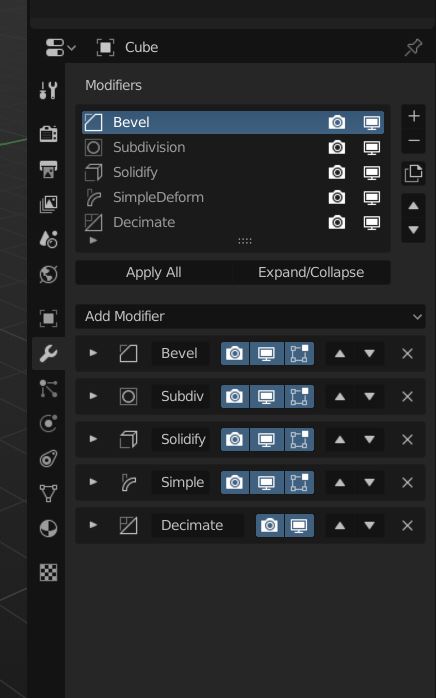
I tried implementing a modifier stack manager for blender. Currently the addon can rearrange, duplicate, add or remove, rename modifiers from one place. You can also apply or expand/collapse all modifiers.
It would be great to rearrange using click and drag, but, it looks like UIList type doesn't support that yet.
Download link: github.com/salaivv/modifier-stack-manager
I initially posted this on Blender.Today . People there asked me to post it here.
It will be good to have a modifier stack come with blender by default.
41 Comments
I tried to branch and commit your addon, but it seems I only have permission to fork it. Here is how I improved it:
The reason I divided the two systems is that now there are two ways to show/hide and add/delete. It would feel redundant and disorganized - so for a better UX I made the new system as an overview, the other as the stack.
Download modifier_stack_manager.zip
* @Andres Stephens - Trinumedia * Where can I donwload that fork? I can't seem to find it anywhere
* @xdanielcalderon * from link in the post, that you just answered…
* @ Vyacheslav * I may be blind but didn't you only link the addon, not the fork which is what I asked?
* @xdanielcalderon * I haven't forked it on Github yet, I just... "forked" it and uploaded it to a zip here for now. The code for it is relatively quite straight forward. You think I should fork it in Github to maintain it with a tracker and everything?
* @Andres Stephens - Trinumedia * Sorry, apparently I wasn't clear, I wasn't refering to the modifier addon, I use this one blenderartists.org/t/modifier-list-1-3-1-improved-lattice-other-stuff/1147752 which while doesn't show all the modifiers options at once, has some other options I was asking for fork version of blender with the old ICONS.
* @xdanielcalderon * oooooh. The forked Blender is at www.bforartists.de - with the former icons. They released Bforartists 2 - Alpha 0.6.0 forked from official Blender 2.8.0 just yesterday.
* @Andres Stephens - Trinumedia * Would it be nice to have some highlight in the selected/active modifier? Very difficult to determine the active one because all of them looks the same especially when arranging.
I guess it doesn't need to be very clear. Even if the highlight is toned down would still be very helpful.
* @japzzz009 * Good point. I am not sure there is an api for "active" or "selected", but I probably should dig into this. I with the list also was sticky to the top, but there is no UI element like that.. (only in the VSE?!)
Nice! I have a few suggestions. Wouldn't it be a good idea to just show one modifier at a time always if you have a list of them in that dark box anyway? It's not like you can edit more than one modifier setting at a time, so just having the list and selected modifier shown would remove the need for the modifiers to have their own boxes as well like it is on live.
Here's a quick sketch based on your last image describing what I mean: {attachment Modifiers_list_suggestionpng}
* @Frozen Death Knight * Yeah. It will be nice to show just the active modifier on the list. I think 3ds max modifier stack works that way.
But, I m not sure if it is possible to reorganise existing UI code if you are doing an addon.
Also, regarding moving the add modifier menu up, currently, you can append or prepend your UI code to the existing UI code. I am not sure if we can insert our code in a custom position in the UI.
But, yeah, it will be nice to see the stack the way you proposed.
* @salaivv * Glad you liked my suggestion! :D
Well, that's a shame. Maybe someday it can be added to Blender itself.
Anyway, nice addon man! :)
* @salaivv * Check with the devs about that, either on devtalk or chat. The twitter post that @ xan2622 linked to is capable of only having the selected modifier visible.
* @salaivv * Not trying to jump in and take over someone's already great addon, but I figured out how to make only the selected modifier display, but you have to remove the panel (DATA_PT_modifiers) completely and recreate it. This adds a good bit of code, because the layout of every modifier has to exist inside the class that draws the modifiers. As it says in the builtin properties_data_modifier.py file:
so now, the modifier has 1800+ lines instead of 200 or so.
I made a branch of your addon here: My Modifier Stack Manager
I got rid of the Expand/Collapse button since it wasn't needed any more. I was also thinking all of these buttons could be eliminated, since they are now redundant, as long as the Edit Mode button was added to the UIList.
I was going to try to tackle that, but ran out of time for today.
What can I say other than, I wanted to see how difficult it was to remove UI elements and what had to be done to recreate them if needed. I was bored. All the best, and great idea. Thanks!
* @dpdpforlife * Wow. Impressive! I tried doing it, honestly couldn't figure it out.
I think instead of doing it as an addon, if we submit a patch, may be we can reduce the code redundancy (atleast until modfiers become nodes).
I ll ask about it in the devtalk.
Good work!
* @dpdpforlife * I found a bug, the addon messes up the bind/unbind button of the surface deform modifier. There may be more buttons being affected but I haven't found yet.
* @dpdpforlife * * @salaivv *
Super cool to see some collaboration! I hope you guys can make the patch a reality. Glad I was able to contribute with ideas! :)
As for your last screenshot, dpdpforlife, I would suggest keeping the modifier icon and title if you remove all those buttons. Just so that it's always crystal clear which modifier is selected as well as making it easier to rename the modifier if you want.
Btw, is there a way to toggle visibility for all the modifiers at the same time? Would be nice to have some controls for that, as well as toggling the other view mode icons.
* @dpdpforlife * Interesting fork. Also it solves this problem: blender.community/c/rightclickselect/tsdbbc/
Idea of new feature (if possible): show few modifiers with multiply selection in stack
* @Frozen Death Knight * “As for your last screenshot, dpdpforlife, I would suggest keeping the modifier icon and title if you remove all those buttons. Just so that it's always crystal clear which modifier is selected as well as making it easier to rename the modifier if you want.”
Already done. I did that not long after my post above. I also put a field so you can rename the modifier to keep it consistent with the material editor. We need to make it so when a modifier is added, it becomes active. Otherwise it’s working pretty well. I’ll start going through and seeing if there are other buttons and features that are broken. I also haven’t tested this with grease pencil modifiers.
* @ Vyacheslav * That's a good idea definitely worth looking into.
* @Lance * Thanks!
* @dpdpforlife * interesting solutionm but it hides 4th button (on cage) for solidify and ruins something in blender after deleting: modifiers scroll become empty forever. After reinstall it doubles stack-list. So it would be great if you or someone will fix it.
@salaivv totally agree, this should come with Blender by default, maybe you can add an option to hide the resume stack and show just 2 buttons, or just collapse as Modifier Stack section, this could be useful option for classic users who like the old way, or just have small screens.
This fits in beautifully with the desire to make the interface more unified, since it mimics the material editor.
* @dpdpforlife * Thank you...! :)
This maybe the best addon I have added recently. Thanks dude. I think this would go well with the modifier tools addon.
* @japzzz009 * Thank you. :)
Man, this is really good script! Exactly what I needed. Thank you for sharing this plugin!
* @kosir.milan * Glad you like it!
I had to go back and edit a model that had tons of modifiers just now. I worked for just a few minutes with the old style list of modifiers and then turned this addon back on, and it's a huge time saver. It was so much easier navigating the modifier stack this way compared to the default blender method, that I don't want to go back to the old way.
cool.
I have followed your work on this in Twitter, and agree with you. It should be default and would make the way particles, materials, vertex groups and more work - the box and the overhead before the stack. It's consistent with the general UI.
* @Andres Stephens - Trinumedia * Yeah! Sometimes, it becomes really difficult to manage the stack when you have a lot of modifiers.
Especially when modifiers are in expanded view, keeping track of modifiers is hard when rearranging.
Very nice addon! Only missing features are:
Guys, looks like drag and drop features are coming to the modifier stack in Blender 2.9! Although it's too late -- because modifiers will get replaced by the Everything Nodes project -- it still feels great to be able to finally drag and drop modifiers. It's been the most requested feature in Rightclickselect for a long time and it's finally coming.
You can grab the latest build of the modifier-panels-ui branch here .
This combined with the Modifier Stack Manager add-on would be an amazing combo to work with!
Sadly drag n drop do not work everywhere in Blender. So this is the main point, that should be achieved once.
With modifiers it is planned to make nodes, that can be mixes as you wish.
Here is another idea related to modifiers (drag & drop) :
blender.community/c/rightclickselect/fbbbbc/
developer.blender.org/T38178
It reminds me of this similar script:
twitter.com/FinEskimo/status/1106948247489257475
* @ xan2622 * It looks like the one you link to does what I was thinking when I first saw the proposal: it would be cool if only the properties of the selected modifier showed up underneath the manager and not the full list. Then it would work more like the material editor.
* @dpdpforlife * Yeah. Doing so will make the UI more consistent with materials and particle system editor. I ll look into it. Thanks!
* @dpdpforlife * Though I'm too keen on pinning and having the stack hidden per default, as sometimes you do want to see the stack by default on creation to see how modifiers interact and to quick tune them all on one mouseover - then you'd hide to isolate to refine in the workflow.