
Output rendering animation
Is it possible to have a native possibility to activate or deactivate the default animation output blender.
it's a pain to find after rendering an animation with duplicate files.
1-files from node file output (desired file) blue square.
2-properties/output files, (not desired) which is often found in the /tmp\ folder Red Square
If we don't fill the path of the Output animation, it stop at the first image.
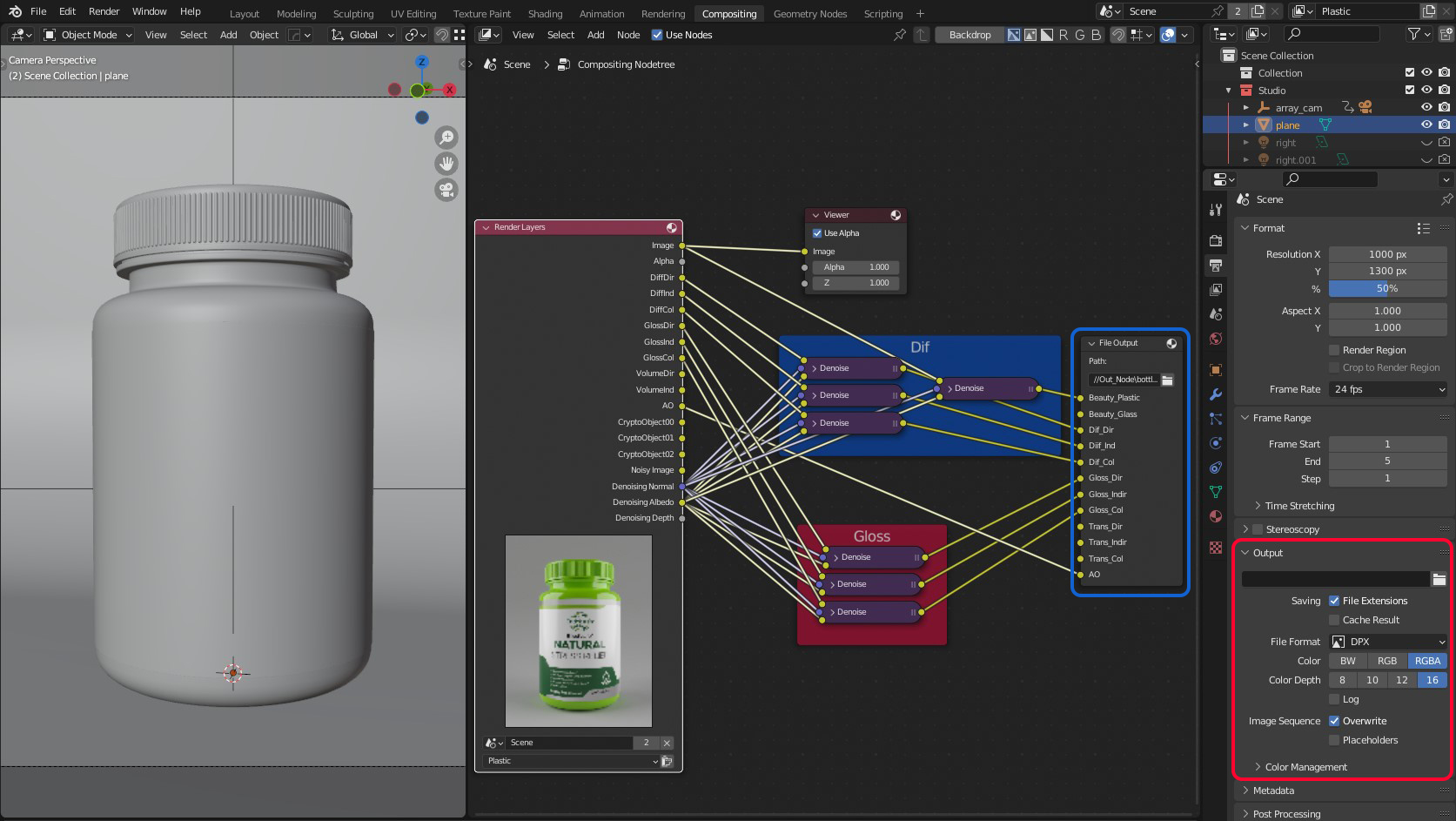
if you have a method to propose I gladly accept it
3 Comments
yes that would be nice. The best you can do is set Blender's own output to something very light such as extremely low quality ffmpeg
I thought it was already the case 👀
When using the compositor, either you output your data into a Composite node which uses the scene output settings, or into a File Output node which uses its own settings.
I'm pretty sure I did it in the past, but maybe I'm wrong...
I am posting a bug report, will keep it posted here.
⚓ T102447 Rendering with a file output node instead of composite still writes the files twice
Turns out:
There's already a task for it, just not started yet:
⚓ T57699 Doubled Animation Render Output using only File Output Nodes
And it also was proposed on RCS already:
File output node & default output — Right-Click Select