
Knife tool à la Maya
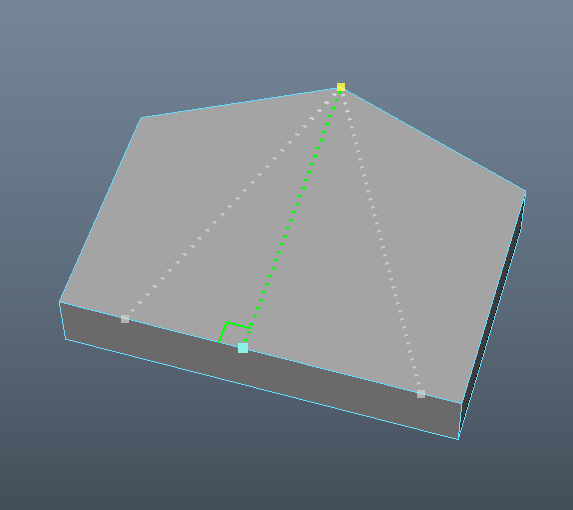
Yeah, I know, Maya is the evil word in Blender's univers, but still, Blender could steal this from Maya and it would be very useful. In Maya, when you press CTRL-SHIFT, you get guidelines that shows you, and snap, at 90 degrees from the start vertex. As you can see in the attached image, I have three choices because there are three possibilities. Just go on the one you want and click. Extremely useful. And shift will snap at every 10%, not just 50%.
5 Comments
It's not evil word and this feature was already suggested here. Today search on this website work wrong - when you search for something and it was too many results and you press" load more " it load " more " not search results but something else. But anyway - try to use search before writing suggestion.
* @forestgumpovu4 * [off-topic]: Have you reported this on the dillo issue tracker ?
* @Jason van Gumster *
Does anyone tested it before update on something like more than 5 search results?.....
No I not report it. It work this way from last changes moment. Any Search + Load more gives " More " something else but not what you need.
Is there somewhere was any information about this Dillo Issue Tracker? I hear about it first time today from you ... How any user have to know that if he find bug he can report it somewhere?
* @forestgumpovu4 * Pablo and Francesco are the developers for Dillo (the backend to all of the blender.community sections). I think in the initial announcement of blender.community , they mentioned that they were doing the development and encouraged people to use the Issue tracker. Of course, that was a while ago. The site could probably do with a direct link there for things like this.
Of course, for feature requests on the site itself, that belongs here, but using the Meta tag.
I did. And I could find it.