
Hybrid Compatible keymap - ALT camera & QWER move/rotate/etc, otherwise Blender defaults
It would be good if there were a Hybrid Compatible keymap that mostly keeps default Blender hotkeys except for camera/view control (ALT-click & drag etc) and QWER Select/Move/Rotate/Scale.
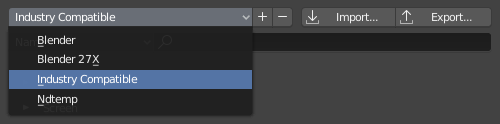
This would be a good middle ground between default keys and mapping similar to Maya or 3dsmax, so you don't have to relearn muscle memory for the most frequent basic operations but you can still follow tutorials. The Industry Compatible keymap changes the keys so much that it becomes impossible to use tutorials at all, which conflicts with the goal of making it newbie friendly.
Edit: As suggested in the comments I have made an attempt at creating this alternate keymap myself.
I've created a new suggestion to propose this alternate keymap.
10 Comments
This would definitely be more sensible than the current implementation and is exactly what I did in 2.79 using the following changes from the Nimble Collective guys nimblecollective.com/maya-will-it-blender/
These changes meant viewport navigation was consistent with Maya/Unity but crucially any workflow keys were left untouched meaning tutorials were still easy to follow.
Honestly I just wish they would have spent this time making additive keymaps a thing instead. Would have been so much simpler and we'd get a lot more use out of it in the long run, and it'd be insanely easy to make specific bite-sized keymaps that do exactly this type of thing.
* @testure * what do you mean by additive keymaps?
* @alphyn.dp * currently, when you export a keymap- it exports everything that is bound to any type of input. an additive keymap system would only export the things you changed . So, if you wanted to share your nav keymap, or UV keymap, or animation keymap or whatever else with somebody, they could use just that because it wouldn't overwrite all of the other hotkeys they currently had bound. If you wanted to you could even cobble together a ton of small keymaps and add them up to whatever makes sense to you.
As an artist, the sensible thing that you can do in this case would be to make the actual keymap itself and post it somewhere (linked here, of course) for other people to try out. Then we'd have a better sense of how it would work and how many people are interested in it.
* @Jason van Gumster * Fair. I'd have to think about where to put Q favs, E Extrude and R rotate as pointed out, and I think my personal priorities for quick access might be different from others', but I could take a stab at it, certainly.
* @Jason van Gumster * So I made an alternate keymap. I think it works pretty well. Feedback welcome: ninjadodo.net/temp/blender_hybridkeys_v1.zip (includes notes on what I changed)
I've made an update with some more fixes and changes: ninjadodo.net/temp/blender_hybridkeys_v1_2.zip
Interesting Idea, I would very much like to have just the universal (ALT) camera controls. In fact, I tried doing it the other day and I failed when I tried remapping things that use the Alt key, like loop select, to something else, like double clicking. Blender's keymapping settings were meant to be very customizable, but they are very hard to wrap one's head around unless the user is one of the developers. I thought I set up everything correctly, but it gave me very unpredictable results, for example, sometimes shift+double clicking a selected loop excluded it from selection, sometimes it only excluded a single vertex or edge, and sometimes didn't work at all.
As a result, I wasted a lot of time and went back to the 2.8 configuration with very few minor changes.
My point is, a more user friendly way to customize the control layout might actually be a solution to this issue.
* @alphyn.dp * Yeah, the thing that makes creating custom keymaps tricky is there are so many overlapping hotkeys referring to the same buttons, even for the same operation in different contexts (and few tools to mitigate this). I made another suggestion specifically to clean that up: " Unify similar operations into a single hotkey setting "