
Alternate Hybrid Compatible keymap - ALT camera & QWER transforms, otherwise defaults
The Industry Compatible keymap is a good idea, making it easier for those familiar with other software to get into Blender. However, it changes so many keys that it becomes impossible to follow tutorials, which conflicts with the goal of making it newbie-friendly.
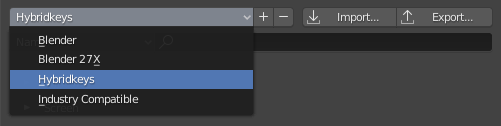
It would be good if there was a hybrid keymap that mostly keeps default Blender hotkeys except for camera control (ALT-click & drag) and QWER Select/Move/Rotate/Scale .
This would be a good middle ground between default keys and mapping similar to Maya or 3dsmax, so you don't have to relearn muscle memory for the most frequent basic operations but you can still follow tutorials. I previously suggested the Blender team should add something like this, but it was rightly pointed out I could make an attempt at this myself.
To that end, I propose this Hybrid keymap . It can be found here, notes included:
ninjadodo.net/temp/blender/blender_hybridkeys_v3_1.zip
Notable changes are ALT-camera manipulation and QWER transforms as mentioned, as well as a few more changes to accommodate those two (like Quick Favorites ~ and Extrude SHIFT-E), plus a few other tweaks. For more, see "readme" notes.
21 Comments
Changelist:
Version 2.0:
Rebuilt for 4.0 adjusting to default map changes. Added CTRL-Y alternative Redo.
Version 2.1:
Rebuilt for 4.2. Fixed Grease Pencil Alt Mouse conflicts.
Version 2.2
Rebuilt for 4.5.
Version 3.0
Rebuilt for 5.0. Switched Z Shading Pie Menu with SHIFT-ALT Z Overlay Toggle.
Version 3.1
Rebuilt for 5.2. GP Insert Keyframe (menu) S changed to Insert Blank Frame.
Thanks for sharing this keymap, I'll definitely pass this on. Having an official "light" version of the Industry Compatible Keymap would be extremely helpful. This is something I've discussed with other industry professionals wanting to switch, and the general sentiment is that the Industry Compatible Keymap is WAY more extensive than is necessary, to its own detriment. Instead of lowering the bar for entry, in many ways it raises it as everyone from support forums to tutorials to courses refer heavily to hotkeys, very few of which are accessible in the industry compatible keymap, which makes a ton of great learning material for Blender nearly useless.
One little tweak I'd suggest would be to also add classic 1234 support. Blender already supports 123 for changing selection modes, but 4 doesn't go to object mode like usual. I edited your keymap for my own use, here it is with that small tweak: dgruwier.dk/resources/hybridKeysExtended.py
* @David Gruwier * That sounds like a sensible tweak. Might include that in an update.
* @David Gruwier * Updated the keymap, including your suggestion.
Went back and forth on this one, since it conflicted with default Collection hotkeys but found I would often press 1-3 outside Edit mode and toggle Collection visibility accidentally, which was annoying... so ended up adding it, alongside some fixes.
* @Christiaan Moleman * Yah i hated the 1234 for collections had that issue of hiding things unintendedly constatly, the only thing that really bothers me the about 1234 for vertex, edge, etc
Is that that's only oriented to modeling, and for animation those keys become unsable, In 2.79 era we had Hold Tab for Piemenu of Mode, and then ctrl tab when you where in any of these modes to switch to sub modes, which worked great, because every object type has a different number of modes, and every mode has a different number of submodes if you assign the numbers basically you lose all the numbers row because of a few object types that have more than 3 modes.
My conclusion to all of this is Tab should be Modes Pie Menu Ctrl Tab Sub Modes Pie Menu
12345667890 should be each Tool from the bar so Arrow, Cursor, Move, Rotate, Scale, ALL - Which in pretty much all modes will be always the same, and then you get from 7 and on for the rest of the tools being able to use shift and alt and ctrl for things like sculpt mode that has 10+ tools.
If we do it like this it will be pretty easy to learn for people coming from other software because it's basically just one row up. And for blender users it would make much more sense now because they would be directly correlated to the tools pane that is next to the viewport.
just my thoughts.
Hey Luciano, a belated response to this: Appreciate the detailed suggestion but this sounds too different from both Maya/3dsmax and from Blender defaults to be suitable for this keymap to me... but it certainly might be worth exploring for a different alternate keymap.
Thank you Christian, this mild version of the industry compatible is exactly what was missing. I'd suggest just a minor change I've done for me: ALT + Wheel In/Out zooms.
Sounds like a good addition. Might add this next update.
I looked into it and it ended up conflicting with some existing hotkeys.
I'd like to second francesco1234's suggestion, this was the first thing I've changed. The conflict was with a frame advance function if I remember correctly, which was way less important then the zoom.
Great job on this keymap, btw, couldn't use Blender (as a former Maya guy) without going crazy every time I want to follow a tutorial with a standard keymap...
Being animation-focused myself I didn't want to get rid of the frame advance function and as I recall I couldn't find a good alternative for that when I looked into it so that's why I left it alone, but maybe with recent changes to defaults in 4.0 it's worth looking into again. No promises tho.
Glad you've found the keymap helpful!
This is legit the best. I think this would be a perfect addition to default Blender.
As you rightly pointed out the Industry Compatible keymap is far to extensive. I think most people coming from programs outside of Blender just want to navigate like they normal would. Everything else is personal preference really.
The current Industry Compatible really tripped me up. I was like yes! I can use Blender, but then I couldn't follow any tutorials so it really put me off. Anything to make the transition smoother and easier is welcomed.
Greatly appreciated. Made my most recent Blender usage the least clunky since 2005. Honestly should be the default behavior. Having used every app since 1995 and being able to adjust to all of them fairly quick, even Zbrush, I always found Blender had zero rhyme or reason for having certain keys setup. Absolutely zero reason for certain key shortcuts or except that it is just what they had made. I like many of their features since 2.8 and appreciate their pie and quick menus. It is slowly getting there as an app to take seriously for even industry people since so many hirable talent has at least some Blender knowledge. Still has certain things I shake my head at like the primitive creation not maintaining a tool history so if I click once and move the object I can forget about setting the sphere or cylinder division properties afterwards. Overall though this Keys+Blender defaults is the true winner in terms of bringing real professional traditional 3d navigation to this rebellious little app. Thank you for the efforts.
This should be included in the official build. Thank you for the hard work, really appreciate it
Welcome to Wimbledon Dentist, your premier destination for top-quality dental care conveniently located in Wimbledon, London. Our clinic prides itself on offering a wide array of services to meet all your oral health needs. From emergency dental care to Invisalign treatments and teeth whitening services, we're dedicated to ensuring your smile is both healthy and beautiful. Our team of experienced professionals is committed to providing personalized care in a warm and welcoming environment. Whether you're due for a routine check-up or seeking specialized treatments, trust Wimbledon Dentist to deliver excellence in dental care tailored just for you. Experience the difference with Wimbledon Dentist today. Our Dental Treatments are as follows: • Invisalign • Private Dentist • Teeth Whitening • Emergency Dentist • Facial Rejuvenation • Sports Guards • Anti-Snore Device • Root Canal Treatment • Dental Implants • Dental hygienist • Dentures • Tooth Decay • Oral Surgery
I agree. A hybrid keymap is a much better balance for users coming from Maya or 3ds Max while still keeping Blender tutorials easy to follow. For those interested, I also found this useful guide on vanced apk
This feels like it should replace Industry Standard as the default - as a new user with years of 3ds Max, Maya and Houdini, I've gotten so much more value out of every tutorial and LLM response for help by using this keymap instead.
Yes, this would be amazing! Please add this hybrid keymap to the official release!
As a long time user of the Industry Compatible keymap, I stand behind this idea completely that a lot of the basic operations being excluded are a detriment to the Industry Compatible keymap.
This keymap fixes it, while maintaining some of the best features from both (mainly the 1234 mode selection and ALT-camera manipulation).
Cheers and thanks to Christiaan for putting this together including a detailed process video!
If you're looking for tips on how to make your own custom keymap I've made a long walkthrough video that goes through the whole process of making this one: youtube.com/watch
Hi Christiaan, Can you share the process for creating and maintaining your hybrid keymap file to keep it clean? I created my own keymap (which is very close to your philosophy of keeping as much Blender default as possible, but with a few changes and additions). But Blender has HUGE bugs related to keymaps, so I ended up with thousands of duplicate copies of hotkeys for add-ons like Node Wrangler. (This seems to be a known issue for like 8 years!) My file ballooned to 800kb, while yours is only 246kb. I really need to learn how to keep my keymap from getting corrupted like this. It's my biggest frustration with Blender!
I already responded via email, but for the benefit of everyone else I've also linked the process video in above comment. Hope it helps!