
Keymap management through new filters
This is a proposal for a better Keymap management through new filters, particularly useful when porting previous userprefs to the newest Blender version, so we can clean the keymap more efficiently.
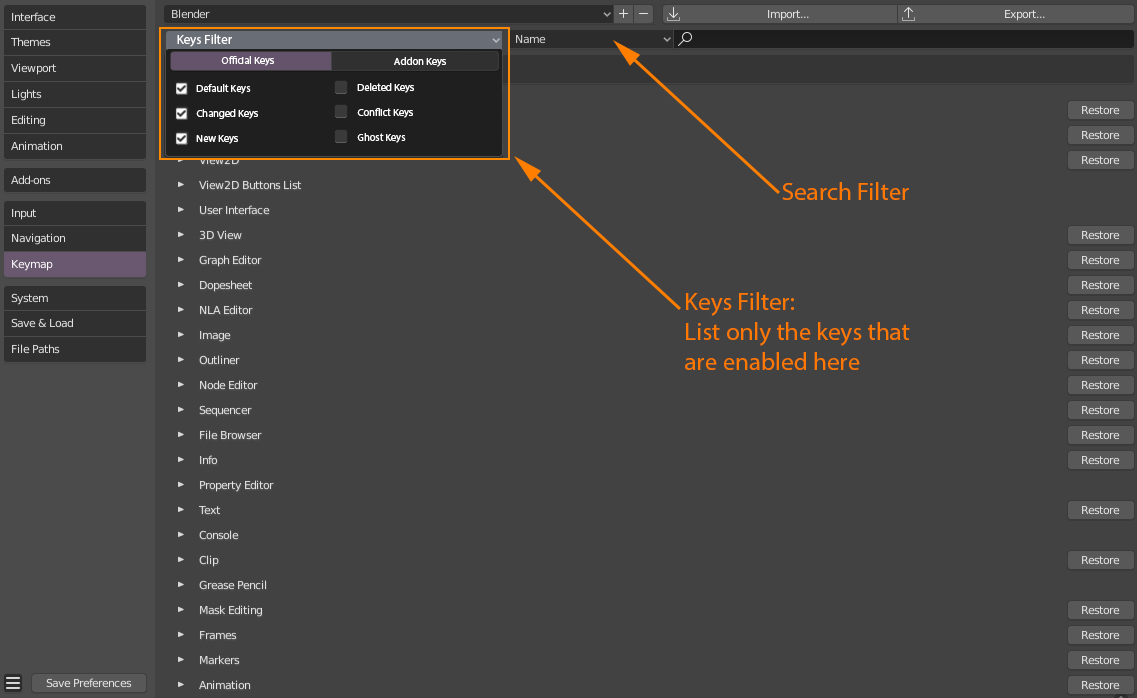
There are two main filters (can be both enabled at the same time or one by one, both are enabled by default):
- OFFICIAL KEYS: shows only the keys that are official to Blender, they have to come from the installation folder (C:\Program Files\Blender Foundation\Blender) to be considered official keys.
- ADDON KEYS: shows the keys that are coming specifically from addon scripts (either from "...\AppData\Roaming\Blender Foundation\Blender\2.80\scripts\addons" or from "C:\Program Files\Blender Foundation\Blender\2.80\scripts\addons").
And then, there are default sub-filters , applicable to both "Official" and "Addon" (enabled by default):
- Default Keys: keys that haven't been touched by the user.
- Changed Keys: keys the user has changed.
- New Keys: keys the user has added.
And finally, there are special sub-filters , used to detect and single out specific errors (disabled by default). When clicked, they disable the rest of the other sub-filters (they are Solo Mode if you will).
- Deleted Keys: keys the user has deleted (with the cross) from the Official or Addon database. Maybe could have a restore button next to it as a way to restore only that one, and not the entire editor keymap (disappears from the list if restored).
- Conflict Keys: shows all operators that share the same shortcut within the same space, mode or editor, that will lead to one of them taking priority and occlude the other.
- Ghost Keys: keys that do nothing. Often unnoticeable, they can be a new operator miswritten by the user, but most likely an obsolete key after an API break occured for that functionality. Example: when the operator "view3d.select_border" became "view3d.select_box", it still remained as a ghost key: "VIEW3D_OT_select_border", before I removed it after spotting it.
3 Comments
OH GOD YES PLEASE. This is a simple solution that would tackle a lot of issues I mentioned in another thread here
From my UX - add " pin " button and store pinned items duplicates on top inside special expandaple/collapsable section.
Sometimes it need to find something by assigned keys, then if I want to change keys to something else it just disappear. But what if I want to try some different keymaps? It need to reset filter and find this item again with no filter what is hard quest if it's nameless "context" operator. Anyway - do extra moves/clicks.
So why not just pin item and play with assigned keys as much as needed.
This would be awesome