
Visual Hotkey Input Editor - General Vision Proposal
Issue
 Making input maps in the current hotkey editor is really... really.... slow.
- No hotkey conflict checking, has to be manual
- No fixed header for navigation, have to scroll to top to search hotkeys/operators
- Sections are divided per editor AND globally together, no ability to know what is available or not without heavy scrolling and cross-referencing
- No clear definitions and tooltips
- Mouse and Keyboard hotkey/input functionality is mixed together
- Assigning keys from the UI will not show any conflicts nor hotkey availability
; when a conflict is made, latest entry will work, or both entries won't work at all.
- When a similar hotkey (transform, view selected) are consistent throughout various editors, if you change one in one editor, changes won't reflect in the others in other editors. You have to re-assign dozens of times to make the change consistent.
- Hidden menu's and Pie Menus are hard to find by fliter and also to assign hotkeys to (and currently impossible to assign hotkeys to a floating/detachable menu from the UI)
- Toolshelf operators also are not listed by filter, making them either muscle memory upon creation or just.. guess work.
- Addons have full reign to add and over-write hotkeys despite conflicts with no warning; and when addons are removed, added hotkeys sometimes still remain
- You cannot search for mouse modifiers (drag, press, click, tweak).
This makes making water-tight hotkey maps and edits a very hard, tedious process. Sometimes using code writing and verification in the .py file directly is more efficient, which the majority of artists using Blender won't do. This process takes hours, and should be automated (the checking part and the availability feedback part)
Long Term Solution
Re-designing the hotkey editor or create another third party opensource hotkey authoring software with Blenders API to generate input hotkey maps would be a solution and save countless hours making custom keymaps for hundreds of operators.
Key targets:
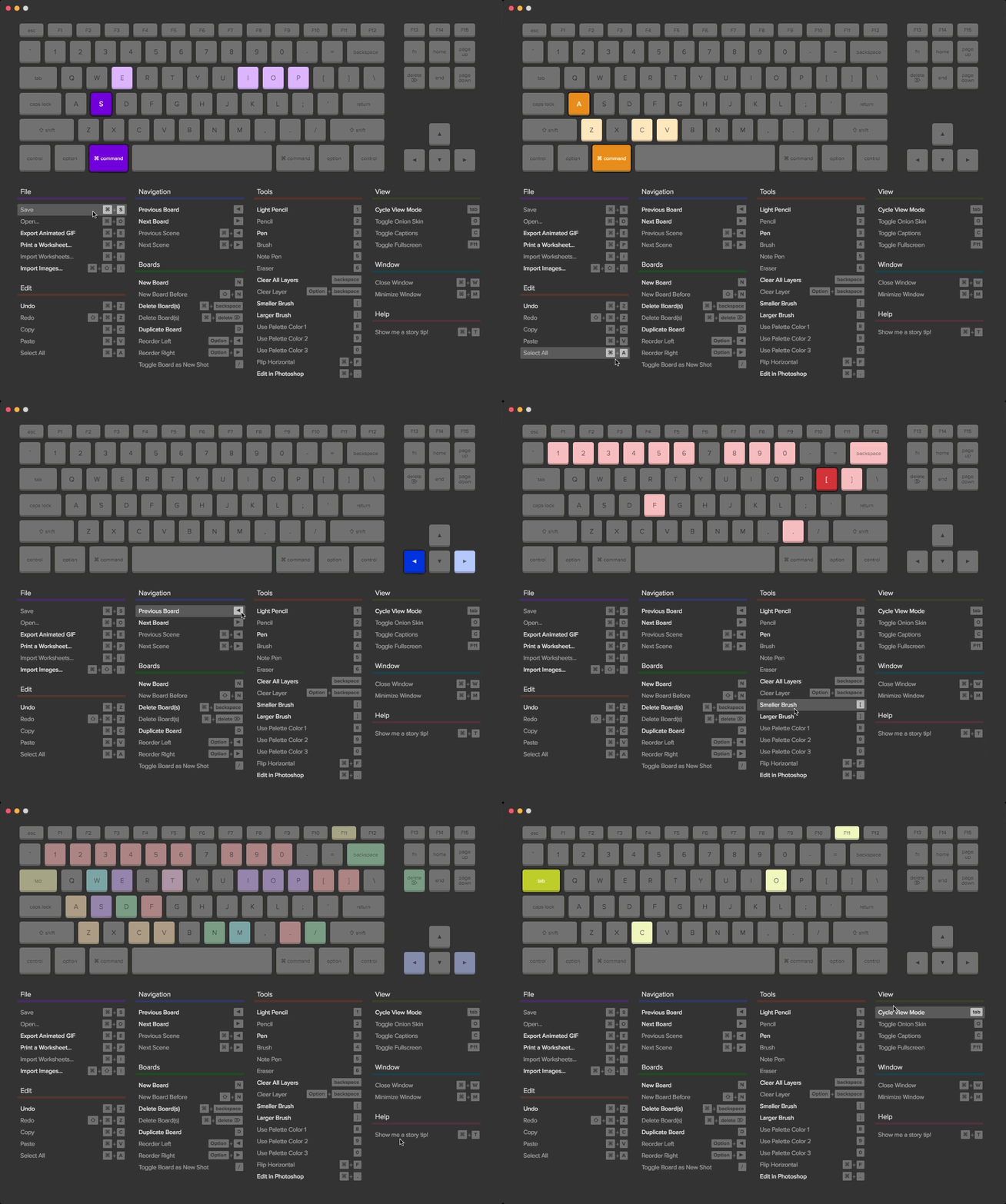
- Have a visual keyboard to show modifier toggle feedback - including mouse functionality and modifiers
- Have visual greyed out keyboard keys to show feedback on availability
- Show operator list with multicolumn list sections for hotkeys - displayed per editor or globally instead of just a list
- Show operator properties in a side panel based on what is selected (instead of toggling many sub-properties open and loosing track by shifting positions muscle memory can't cope with)
- Pin an operator property in a side panel for comparison or drag drop mutual properties for re-creations
- Colour code editors and operators and have tooltips to show what category and operator is/does what on the visual keyboard
- Filter Toggles to show what hotkeys are global in the list, and what are per editor
- Editor isolation search filters (not just hotkey and operator filter)
- Interactive Highlight of hotkeys when mouse over an operator
- Interactive highlight of operator when mouse click on a hotkey
- Consistent changes on similar functionality across editors (if there are 3 or more similar operators across editors, it would be considered a "global" one) - change once, affect everywhere (warn of conflicts)
- Have conflict resolution with warning to "overwrite" "not available" etc.
- Have visual toggle for mouse click, drag and tweak toggles on operator +hotkey properties (eg. have a mouse and switches to show what mode is being used)
- Allow operator dragging to hotkeys to assign and viceversa (drag hotkey to operator)
- A list of correctly named menu's and pie menus to easily assign them to hotkeys or mouse input even if they are not listed in the UI
Examples
Wonder Unit - Storyboarder
 Adobe hotkey editor
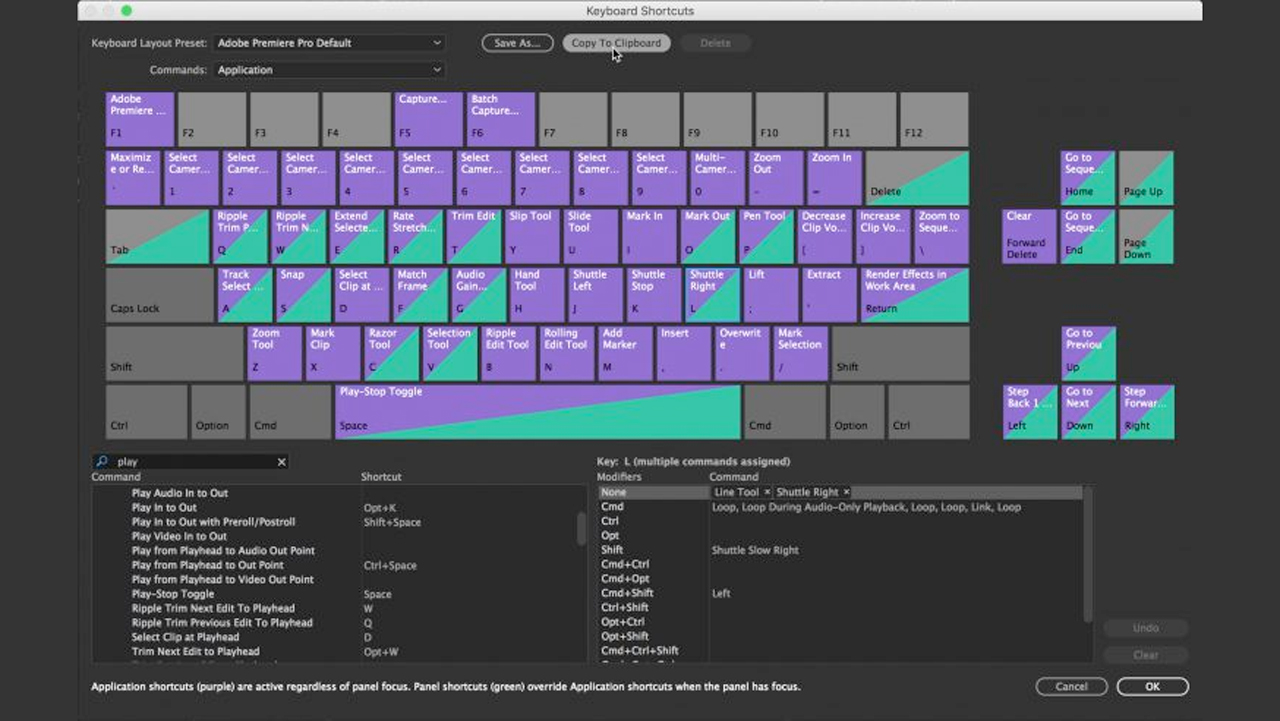 Softimage Hotkey Editor

Short term Solution
- Add hotkey conflict checkers across editors to then show a warning or options to overwrite conflicts in all editors (global), overwrite in only single editor, or cancel conflict.
- Have this warning popup work from the UI and in the current input editor
- Have a system to remove all similar hotkeys at once (Remove "Numpad ." as "view selected" in all editors that have a similar operator assigned) with one click
- Divide the editor layout to first show global hotkeys with per editor functionality listed under the same hotkey THEN later show local editor hotkeys (instead of a confusing global/local hotkey system under the same category)
This will hit half of the long-term target solutions and should be able to be programmed directly into Blender.
Additional Notes
- I know this is a general proposal, but I want to see if this makes sense generally with the community first before proposing individual tasks.
- From here this would need to be broken up into smaller tasks, and either created in the tracker or here to vote on each little step to later be made into small bite-sized tasks
- The first task that really should be approved to start is to develop conflict checks per editor with a popup warning dialogue before the hotkey is created (apply, cancel). Global assignment/edit/overwrite would come second.
If this project interests you or you know how to potentially code things like this, I'd love to know and maybe invest into this. I've lost way too many hours working in keymaps to then spend more hours checking for conflicts, I need this. Get in touch at this email or here!
36 Comments
Wow - you said exactly what i dream about when i came from xsi to blender - thank you. Hope developers will se this!
Have you tried the addon IsKeyFree ? (bundled with blender). After enabling it, you should find a "Dev" tab in the Text Editor.
developer.blender.org/T50835
github.com/Antonioya/blender/tree/master/iskeyfree
* @ xan2622 * Thank you! I have not had a look at this one deeply, but it clearly is working with the theory of checking for conflicts. Definitely a great base to start working on the first task. Thanks again.
* @ xan2622 * thanks, did not know about it
Adding my voice to this suggestion. I have searched for something like this without luck. This would be a huge asset for mastering the power of shortcuts within Blender, not to mention newcomers.
Agreed on all points. Have brought up many of these criticisms myself during the Beta, and the system is in dire need of getting fixed in a future update.
When I first started learning Blender back in December, the hardest part for me was most certainly programming my own keybinds. It took me nearly 2 months of tinkering. while at the same time trying to learn the software. before I got my shortcuts to work satisfactory. With these suggested changes, I could have probably have cut all that time by more than half at the least.
That said, Blender does have a very strong keybinds system, once your mind starts to get a good grasp of it. Fixing the broken UX design would make Blender a lot more powerful and user friendly for a lot of people who do not want to deal with the current Keymap.
Bells and whistles ... Blender has so much hotkeys... And advanced user add even more hotkeys on top of existing + hotkeys for custom PIEs - this visualizator have no sense.
What we need is
Shortcut Conflictmesage popup with buttons likeOverride,Go To Conflict, etc. Implementation of such vizualization need to spent lot of time ... For what and for who? Blender have lot of another things working on much more necessary.* @forestgumpovu4 * I disagree. You can always detect those conflicts and show them visually on the visualizer. Along with a section for every context, you can also make a section for the addon keymap since blender stores them separately from the main keymap as far as I am aware (unless specifically programmed into the main keymap).
* @forestgumpovu4 * Just to respond to the question about the need - for adaptability, flexibility, muscle memory for visual queues and customizability: most artists and even those who make these keymaps for distribution have to spend hours or entire days making the right system or fixing conflicts to do changes - the visual system drops this development time into a fraction of the required time - even on top of a reactionary conflict warning.
Functional conflict resolving through reaction is one method and will be the first target, but still technically slowish, but resolving visual conflict through nearly mindless prevention is the most efficient. This will allow easier customizability, more adaptability from people who like their hotkeys from other software, and it will free up any hotkeymap developers time spending effort on rolling out improvements to hotkey maps (as you notice, this can take between days to months on every single little change). And, this would be accessible for memory, you wouldn't need to open every single menu to understand where to put your hands - and you could just press keys and see what they hidden functions of a keyboard show instead of alternatively write, erase, write, erase, write the modifier + key, erase. It should automatically filter and show with the least amount of effort.
* @MizManFryingP * Your exanple pictures about nothing. Not even close to what Blender is - just expand ALL of keymaps ... What a mess have to show this vizualizer.
IMHO - conflict poput, etc. YES, any key vizualizer - NO Still have no sense/bells and whistles/waste of devs time suggestion. If operator have assigned
Ctrl + Vis'tCtrl+Vand nothing else, no need for colorfull picture to show it. If it have conflict - just highlight it as some red and add button to show conflict operators. Add filter " Conflicts ", etc.Vizualization with big colored keys is for kids, my grantma, idiots, etc. ....
* @forestgumpovu4 * That's specifically why I said sections . Read my other comments. You can switch between sections that will update the visualization as opposed to everything being in one place all at once. Blender has multiple editors and context. This needs to be included when designing something like this. Not to mention I already specifically mentioned that you can expand options as you wish.
Visualization is great for artists and Blender is made for artists. There is no reason to make Blender act and feel unintuitive towards its users. The current way the keymap system is being presented is outdated, very unintuitive and inefficient. People like you who tell others that an intuitive visualization is for 'kids' are probably the same people who are stuck in 2.7 with its design philosophy.
Never take pride in the fact that a program is needlessly difficult to use; it doesn't make you smarter that you learned it, it makes the program less likely to be picked up by more people and the industry.
Your aggressive reply is exactly the reason discussion is being had by people other than you.
"Kids, idiots, etc" what a joke.
* @MizManFryingP * Never felt any difficulty to set shortcut without " colored buttons ". if you are an adult and you still need large colored buttons to understand what's happening - you maybe idiot...
Imlementation of such functionality takes ton of time to develop for very questionable goals. Blender have ton of things which needs to be revorked/added and such thing is not in my advanced user list and never been.
But if someone feel he need it and want to work on it - go on.
* @MizManFryingP * And yes "Visualization is great for artists and Blender is made for artists. " ... I am an artist - Lviv National Academy of Arts master degree in art metal (Ukraine). So what? I still don't feel that I need some colored buttons ...
Blender is Blender, not a Paint 3D .... Complex software. " For artist who still need colored buttons " we have Blender 101 Project
* @forestgumpovu4 * Nobody said it has to be this or that. Its what suggestions are for; to develop a fruitful conversation. Something you seem to be incapable of doing without resorting to calling people idiots. Fix your mentality and learn how to have a normal discussion.
* @forestgumpovu4 * That's great, I too am an artist and went to an art institution (which was a waste of time and money may I add). I've been studying art for 7 years though this has nothing to do with anything. I said Blender is designed for artists as in not for programmers or doctors, etc; I didn't say that to imply you aren't an artist...
If you have a genuine conversation piece you'd like to add, then add it but keep it objective like the rest of us and don't resort to calling people kids and idiots when someone says something that slightly disagrees with you.
I see you edited your comment so I'll reply to it. This is about user experience. At the moment, in order to find conflicts and in order to learn the keymap, you have to search for either the operator or the actual key to press. This is very unhelpful for new users. Since Blender is very shortcut heavy, this could help the learning process of people who are new to Blender. We both know Blender and Paint 3D do very different things, but understand that difficult and unintuitive design does not equal "professional and capable program". If most other programs have this feature, why shouldn't Blender when it so direly needs it?
Or perhaps you'd like to argue that programs such as Adobe's or SoftImage are for 'kids and idiots'.
* @MizManFryingP * My reply is not about - NO DON'T DO THIS. It's about ptiorities. Go on. Have nothing " against it ". I just write what I feel necessary and what is not. " Conflict/Customized " keymap mechanics like mesages/popup/filters/highlights - YES, we need it, colored buttons - NO, we live well without it before...
Also it was a question of Blender package weight - all the unnecessary have to be cutted out. Blender should stay Blender and not become Autodesk or Adobe product with few gigs weight no one know for what....
Maybe such vizualizaton really have sense in case of Blender 101 Project but for profesional users - very questionable.
I see that
this one suggestionget only 5 votes at 17h and here is 38 at 22h. Suggestion to improve one of most common used modeling tool in modeling software to make it able do what all other software can do. I miss such ability so much for so long time. But no one f*ng care...People vote for colorful bells and whistles. WHAT A SHAME!... Keep talking about color buttons.
* @MizManFryingP * Have you tried the addon Is Key Free ? (bundled with blender). After enabling it, you should find a "Dev" tab in the Text Editor.
* @forestgumpovu4 * You do realize this website is about suggesting things to anyone who is willing to take a suggestion on and develop it, right? Not necessarily to the devs at the Blender Foundation. Plus no one said this has to take precedence over other features. This is in my opinion needed for newer users, not just for finding conflicts. Its great for visualizing keymaps as well for new users who aren't familiar with them yet.
But you have the mindset that user experience is for "kids and idiots" which is your right to have an opinion on that, but its really one sided in my opinion. I have a feeling you'd be content using blender as a CMD program since 'professionals don't need ux'.
As for that suggestion, I haven't seen it but I agree with it. Not to mention it has been suggested multiple times before..
* @ xan2622 * To me this suggestion could help new users more than finding keymap conflicts. Since Blender is very shortcut heavy, having a nice visualization of every available options per scene could be really helpful for new users in my opinion.
* @MizManFryingP * So now here collected different sides of view and you guys have written even more arguments for doing this. That is how discussion should look like. Well done.
* @forestgumpovu4 * Alright
Apart from the great ideas, there are too many bugs regarding disappearing hotkeys/ modification of the default keymap when editing a custom keymap, etc. These should also be fixed!
any news about this project. it have great protentional. and suppose to be first priority. I feel this thing gonna be great for Artist even the new Artist. it will be way more easy to set up the shortcut. this was good in Xsi and maya.
Shortcut keys should not need to be customized...
It's a old topic. All we know the problems and possible solutions. The problem is to made a good design that works, not a lot of petitions.
How do you plan on handling the situation where a hotkey is used in multiple different contexts/editors? Would keymap availability be indicated by editor or context? How would you design the keymap editor to give the user sufficient control of that?
* @Jason van Gumster * I can definitely imagine a new 'space' for every mode like object mode, edit mode, pose, etc.
* @MizManFryingP * What about modal operators within a single editor? Would users "drill into" that modal keymap to see context there?
* @Jason van Gumster * If I understand correctly, you mean the keymap that is active while a modal operation is running? I don't see a reason to include that. Is it included right now even?
Like if I press G and want to select say the x axis so I press X? Or maybe I'm misunderstanding.
* @MizManFryingP * That one... as well as other modal operators like Knife cut (for another example)
* @Jason van Gumster * Can you even change it now in current builds? Why would you want to change X, Y, Z, ENTER, ESC C, ALT, CTRL, etc? They are always consistent between modal operators from my experience.
I personally wouldn't even give the option on the surface to change it for consistency's sake.
* @MizManFryingP * They are currently available to change, and need to be, to allow alternate viewport control schemes (such as the alt-centric Maya control scheme).
* @MizManFryingP * Nope - I remapped
YtoCand it work well* @forestgumpovu4 * * @michael knubben * Fair enough, I didn't think of that. I don't know how it works since I never used it, but in that case you could have a little (+) button for modal operators which could drop down a menu (kind of like in the existing keymaps in the preferences)
* @Jason van Gumster * The modals should generally be consistent, so would be considered mostly global entries. If they are not, I would probably have them as local operator modals - in the properties of the operator panel in a sub-panel.
* @MizManFryingP * Exactly what I was thinking. Some modals are global (XYZ) and others are not, but if not they would be part of an operator's configuration in the properties sidepanel in a subpanel. Any global modals would be considered global "operators" and have their own section and visual toggle. I would still need to figure out the step of detecting what is a consistent hotkey/modal and what isn't first and how to re-write compatible keymaps this way - and this would be tasks done after conflict detection, then overwriting options and warnings tasks need to be done also.
I assume to have a system that over-writes global hotkeys may need some internal re-writing of how Blender uses hotkeys (like allowing the use of declared hotkey classes to work a global hotkey system in multiple lines instead of a new line of code with the same hotkey for every new editor, and a hotkey conditional toggles to activate the mode) - so first automatic conflict checking and warnings. But later, it would be awesome to be able to toggle global to local editor hotkeys with a press of a button to have warnings on conflicts. This would be necessary to even START making a visual layout system and the global/local system. But maybe later after investing time or effort into understanding how the system works to improve it - it should be possible.
I'm quite happy with the response, if it sparks up conversation with these amounts of votes, this would be worth drawing up a wireframe and a true design parameters proposal to then strategize and study up the code to begin small doable tasks to immediately improve the system - and save time - because ~4000 lines of code for a similar amount of hotkey entries you have in Blender that you need to review and test manually for onflicts and to memorize with little or no visual queues is not.. humane.