
Edit Mode: Selection Scale/Dimensions
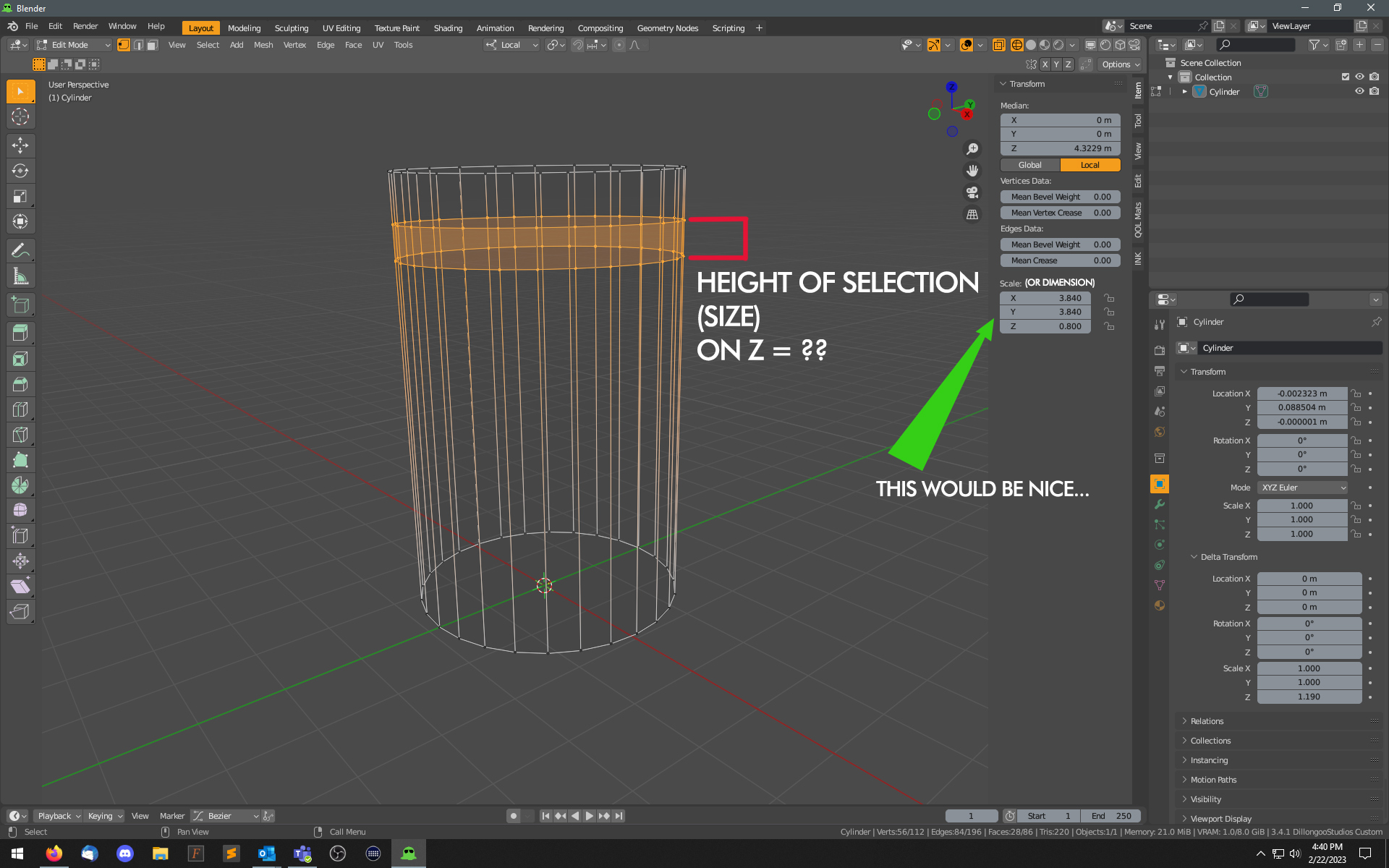
I've searched the UI, I've searched for an addon - and have come up with nothing so far.
Quite simply, it would be great if Blender would display information as shown in the image while in Edit mode.
Internally, it knows where all the points are on the Z axis. It even offers me a "median", in case that's I really want to know(?!). What it really should do is put the little number in there, that tells me "this is FOO units tall", and let me type in a new value to made it the height of my choice.
I made a similar point in another post, but I believe it either didn't quite apply to the other point, or else I was making my point poorly ... so for the sake of clarity, I'm making this a singular separate post.
This idea was marked as a duplicate of Bouding Box / Selection Scale Input in Edit mode.
10 Comments
You can try this addon works fine blender 3.6 or higher You can assign a shortcut to it : blenderartists.org/t/set-dimensions-in-edit-mode/680253/7
Proposed the same: blender.community/c/rightclickselect/PQ1y/ we need this...
I didn't see that, but glad I'm not the only one. I asked about this feature on another board, and was met with discussions on "the scale tool is relative, the numbers cannot be utilized in such a strange unconventional manner" and advised to purchase a CAD program if I needed such precision....
Seriously, this is basic modeling stuff.
I could argue that EVERY 3D-printing enthusiast needs precise dimension adjustment option in Edit Mode! I've been really looking forward to this feature! I do not need "Resize - Scale"- feature nearly that much as I would need the precise mesh dimension resize tool. @BlenderStudio , Please, add Mesh Dimension Adjustment-tool (mesh dimension resize tool) to Edit Mode (that works with selected/active vertices!).
come on!!!
I'm not sure why you'd need this? If you have specific dimensions you can use them when building your model. Say you have a cylinder like in you example and you want a loop cut 25mm from the top and another 32mm below that:
There are also addons that help with CAD related modeling and there is a measuring widget or two knocking around.
Again, I'm not looking for CAD precision; I'm not requesting that Blender become SolidWorks. This is a far more basic thing.
I'm not asking how to make a loop cut to a specific location. I've simply used this image to easily show a selection of points, which easily correlates to "z axis dimensions" in the notations.
"I'm not sure why you'd need this?"
Why did Blender need a video editor? Clearly, Premiere and Vegas and Final Cut and other programs already existed.
But as to "why do I need this" - for sake of discussion, imagine I have another object - a cube, a Foo, a whatever. It already has 2 loops. I want the loops (as selected) to be the same height dimensions in each object. If I could simply select these points and read "Oh, these are .753 high" - boom, select the others and type a number.
I want those rows to be FOO distance apart. Why? Because that's the design I want. Just like "why do you want a font to be 60 pts in size?" Because that's the size you want the font to be. How great would design be, if we didn't know the font size? It's ...something.... tall. If you really want to know large a font is, you should buy a printing press?
I seriously don't understand the pushback on this.
If you asked "how many frames are in that clip", and I said "they fill the duration", or "equal to the number of total frames" - you'd find that an odd answer, yes? Accurate, but completely worthless information.
The numbers are IN the spreadsheet. Blender knows the Z coordinates of the selection, and with that info, it's easy for software to calculate the distance. Why is it so strange that I would want to know what they are, and change them to a new value?
Regardless of whether you need it, there is a need. If for no other reason than for Blender to be internally consistent. Absolute dimension resizing is possible in Object Mode, there's no reason it can't also be available in Edit Mode.
I've wondered about this sort of thing as well, it seems to happen a lot on RCS where you'll get a reply with a 10-step solution to something that should be a single click. My only guess is that people are under some sort of misguided assumption that proposals that they don't find immediately useful within their own workflow have no broader value and thus distract from things that they do find value in. typical 'me first' human behavior in other words.
No push back from me my deewbs - just trying to be helpful. All ideas are worthy of exploration and interrogation.
Sorry my question was taken as a dismissal of your idea, not the intended reading. It was a genuine inquiry. Just because the intended utility of a design idea isn't clear, don't mean it has no utility. My assumption was one of two things; either I didn't understand the use case, or I didn't fully grasp the design. My question was a request for clarity about what you think is useful about the design idea.