
Bouding Box / Selection Scale Input in Edit mode
I'd like to propose something I have yet only seen in Cinema4D so far and never understood why no other 3D software I have worked with has incorporated this into their workflow. It’s so damn simple, yet useful, intuitive and fast to work with.
In Edit Mode show the selection median not only for the location of the current selection but also the size!
In more detail: When you're in edit mode and make a selection of edges, polys or vertices the Transform panel shows the median of the current selection.
- with one look you know exactly where a selection is located in space, either globally or (wit the object scalar included) in relation to the object
- Even better it's not only info - you can also immediately interact with it and change it.
So why don't implement this for the selection
scale
as well? Something like this:
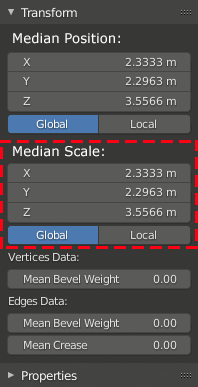
When you're is in edit mode and make a selection this should immediately also display the scale of the selection bounding box and be editable just like the median position.
Three major benefits of this:
- Irregularities: You can actually see immediately if some vertices have been pushed from the grid when you want to do precision modeling. If you know that a selection is supposed to be 2m tall but is 2.03m for some reason you can see that immediately simply by selecting the polygon(s) in question.
- Measuring: You can measure heights super fast in edit mode and without any additional tools. Yes it only work for bounding box measurements but for anything else there are tape measures and using the bounding box scale is surprisingly frequent already enough to work with.
- knocking things back in shape: You can remedy irregularities super quick without ever leaving edit mode.
It’s super easy to scale a selection back to zero in one axis without using the “S → [axis] → zero” shortcut succession and then place it by it’s Median Position just as quickly.
This might also eliminate some of the problems some people are having when losing track of scaling in object and edit mode (which is something a user should learn irregardless, though) - you can see and edit scales of meshes which are part of a larger mesh and could otherwise not be measured as easily.
It’s also IMMENSELY useful for game artists creating tillable geometry, as this has to be created on the grid to snap perfectly.
2 Comments
Yes!
But scale is not very descriptive word, it should be more like dimensions , or bounding box .
"Bounding Box" is correct but sounds a little misleading, I think. dimensions is totally fine. Either way, as long as the functionality is there I don't care so much about what it's called really. :D