
Wireless connections in node editors
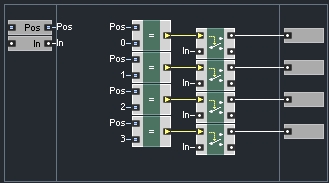
It sounds like a bad idea, but it actually completely revolutionizes the node workflow. Included is a screenshot from Native Instrument Reaktor, which implements wireless connections as follows:
-
Right click on an output socket, the dropdown gives you the option to create a new wireless source (which you can then name)
-
Right click on an input socket, and you are presented with a list of all wireless sources in the current graph. Select one and a wireless connection is made.
(The name of the connection is displayed adjacent to each socket, outside the node.)
This DRAMATICALLY improves readability of more complex graphs, and is one of the few big ways that Reaktor does nodes better then Blender imo. (they're pretty equal overall, where one pisses me off the other is magical and vice versa)
7 Comments
I like the idea, I think it would be clearer though If you had 2 nodes
VariableDefine VariableVariable Definewould allow you to store values with a nameVariablewould allow you to access a named valueIsn’t this simply another way of drawing the noodles? One could toggle the display mode of an existing noodle using some hotkey while hovering over it. This enables one to do quick & easy clean-up after node-tree construction.
* @Ivo * ooo i like that, and they're not incompatible. we could do both at once.
* @Ivo * Katana does this, It makes the graphs a nightmare to debug. I feel that If you have to hide your mess you've done something wrong.
* @rcsfletcher * Well, that certainly is a valid concern and I do share your feel about it. Would it help if the ‘wireless’ness is understood as ‘hidden’ noodles? Then some alt-hotkey could reveal the hidden noodles upon debugging.
Hmmm, this unfortunately leads to a user hiding his noodels to clean-up after node-tree construction and again revealing them once he revisits that node-tree after suspecting a bug. The clean-up then was performed for aesthetic reasons only.
Yet, the wireless-thing does remind me of the 3D-node-tree concept here: blender.community/c/rightclickselect/BHdbbc/ .
Can we untangle this mess?
* @Ivo * i think it really is time for blenders node editor workflow/ui to get a complete reassesment. it doesn't probably need an overhaul, but there are some things here and there that could be smoothed out.
ESPECIALLY for larger graphs. The node editor is really built for quickly making smaller graphs, when Everything Nodes lands we're all going to wish the node editors were built with a little more of a power user mindset.
* @cerebral * I'm sure that the 'Everything Nodes' heroes are thinking along the same lines. But hey, you could contribute some suggestions of your own over there.