
Better and quicker search for node in shading
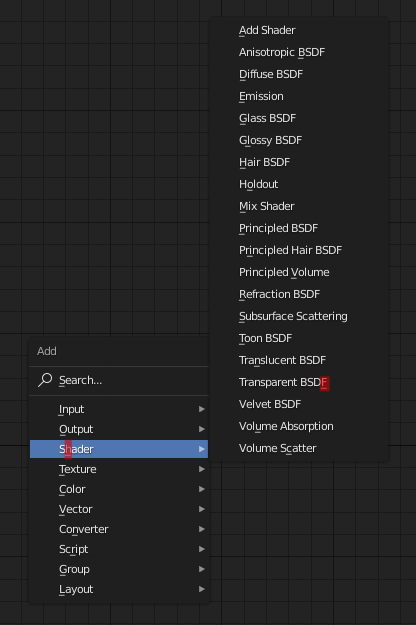
After clicking Add or Shift+A, start automatically in search mode without clicking search or typing "S". Having to click search or type "S" is unnecessary.
The current hotkey system in place is backwards.
At the moment you have to type "O" to go into the Output menu, which works but to go into the shading menu you have to type "H"? Then when you are in that menu every node also has a different letter. e.g in shading you type "T" for Toon shader (great) but for Transparent BSDF you type "F".
Not only do you have to know what group your desired node is in you also have to remember the corresponding letter.
6 Comments
Check this topic.
Just change keymap...

* @IIIFGIII * thank you! So useful! I've added to space)
* @IIIFGIII * This works for someone that knows what nodes to use so I will probably do this for now but would not work for a beginner.
This is not a search, this is fast call. Use regular search, it is easier. And typing TTT to get third option, started with T is not so handy as Tr to shrink list to Translucent and Transparent.
* @ Vyacheslav * I am proposing that they just remove the fast call and replace it with the search. I am autistic but even this is too autistic for me.
* @BuZz Shiro * Why fast call should be replaced? Why they can`t exist simultaniously?