
Delete - Option to include Children
It would be great to have the option to "include children" while deleting an object in the viewport or in the outliner. Being able to set this on by default would also be a nice option.
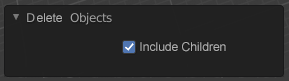
I work back and forth between Blender and Unity and tend to duplicate and delete objects on a regular bases (particularly when prototyping) This small feature would help increase user experience greatly!
Update:
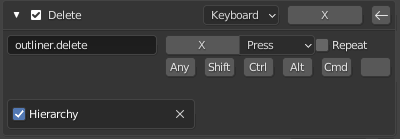
In the outliner there is actually the exact same feature that you can enable in the keybind... seems like this would work pretty well in Object mode too.
I've also posted the idea to be able to include this in the duplicate workflow.
5 Comments
I see what you did here:) I just hope proper groups will make it before we get drowned in small check boxes trying to imitate that functionality.
Is Blender working on proper groups? What does that mean? In my opinion my proposed functionality is suggested because of the way Blender is currently working. To be fair i would just think that duplicating or deleting anything would include all it's children by default. This is pretty standard in all software I know, for example also with folders in windows, folders in photoshop, hierarchies in Maya, Unity, Unreal etc.
in the outliner, 'delete hierarchy' appears to do this. in the viewport its a little less direct, but you can press shift+] to add children to your selection and then delete
Another one of the instances where "it's availalbe" is good to know but still not idea, though. Hovering the mouse cursor over a different area on the screen always feels super sluggish.
On the other hand I do like that blender offers the option to delete a parent without all of the children. Or even hide a parent without force-hiding all the children (yes, looking at you, Maya!)
Yes you are right, selecting with shift-g + extend and than using shift-r to repeat is an option. Comparing to how I work in Unity, Unreal, Maya this feels less intuitive and a small thing that i tend to do a lot. Duplicate including children is also something I would like to be able to check.