
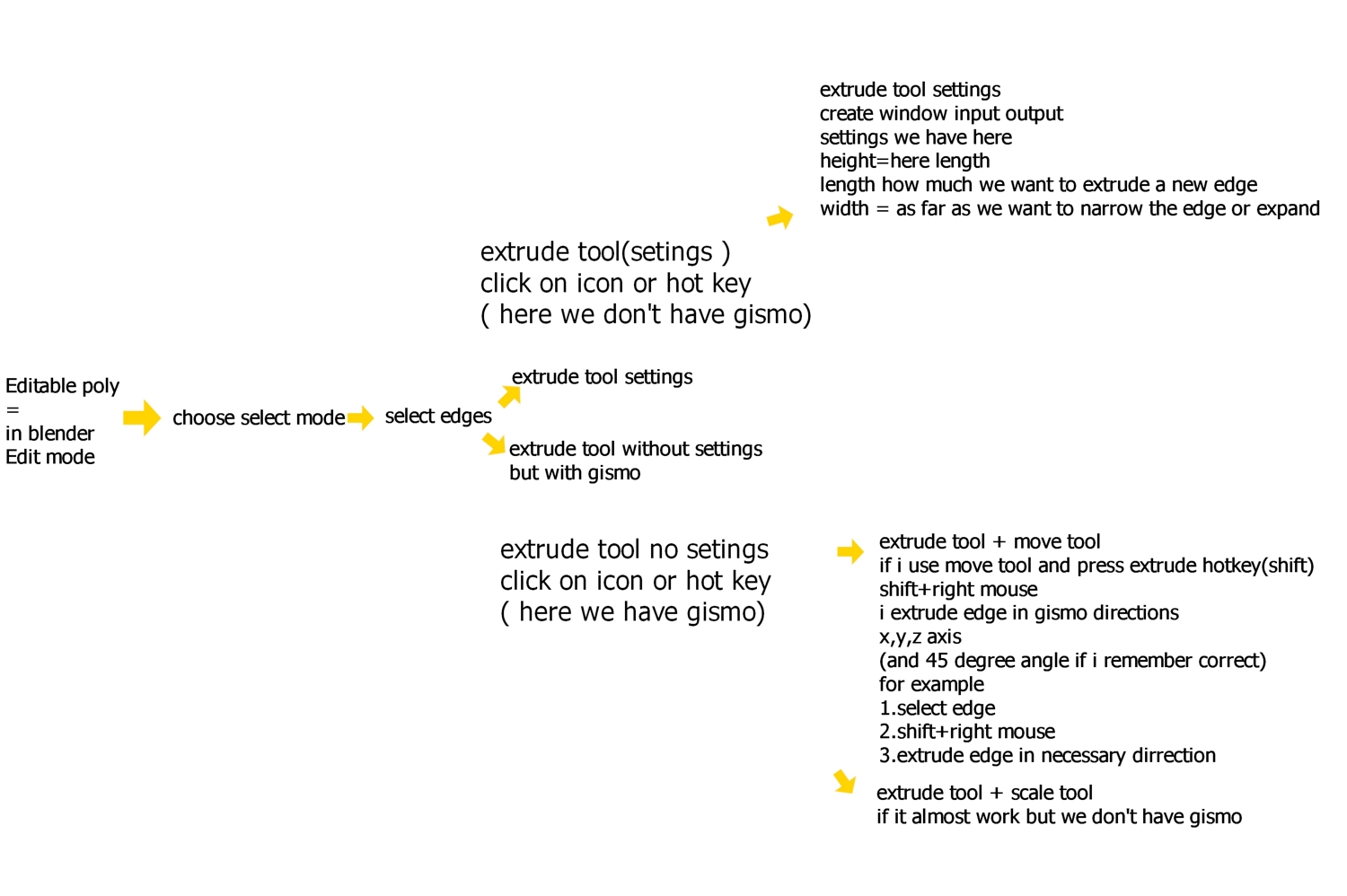
Shift+move=extrude edges fast and easy (like 3ds Max )
accidentally deleted a post. Hi dear developers.
i suppose refresh tool extrude because if i try extrude
i create edge then then i move and guide but it very uncomfortable (also i try give hotkey shift this tool but this always give crash)
please do it like in (like 3ds Max ,Maya , ect)and other software this look like this
youtu.be/Z9wgKy-F1Rw youtu.be/wtKJzbDLo90
its very useful and give more control because you can move and guide the edges and do it very fast and easy
"Be more specific. Create a mock-up of how you would like things to work in Blender." I not programmer i don't know how to create this tool in python I already described the algorithm how it works
examples tool extrude without settings 1extrude+move youtu.be/CpSAG85Rsk0 youtu.be/CpSAG85Rsk0 2tool extrude+scale youtu.be/f92EUp69KHg
tool extrude settings youtu.be/f92EUp69KHg
in my opinion the blender extrude tool very slow .snape to axis it's good idea but we need gizmo. i.imgur.com/2AxYJL5.mp4
15 Comments
So I'm working on a patch to add this functionality into Blender.
youtu.be/TM2x20ZGXLQ
A question is being raised whether this should be added to sculpt mode. Myself, I'm not even sure what would be the expected behavior for sculpt mode transform operators. Suggestions welcome :)
* @Stanislav Blinov * Yes, this is a must have in sculpt mode. I love this feature in zbrush. It works exactly like redwax described in the patch page.
Hey there. has there been any updates on this? ive been scraping the whole internet for something like this. even if its not fully done. can you at least share the unfinished code for it
You don't even understand all the advantages and how extrude work in Blender. You want to work in Blender but work in Max. I comes from Max too, it remind me my self when I started learning...
What I can say today after half year of learning and year of using at work - this 3d Max gizmo " extrude edges " mechanic is slow and limited shit. Now I work without " gizmo " at all.
Ah... Yes. Good luck on hard path of learning. Believe me - it's like ocean in front of u. After mastering Blend jiu jitsu you will look at Max as if it some mid level something.
even +1 from me :)
* @IIIFGIII * 100% Agree. But I think it's good to offer the choice, especially if it helps ease people in.
This is a standard feature of the move/scale/rotate transform gizmo in all 3d apps. Blender needs this. And more, this is not just for edges, it also works in object mode, vertex mode, and faces mode.
Using gizmo is a workflow limitation
Not having this feature is the real limitation.... I can't even remember a 3d app that can't do that...
and that's one of the reasons I still prefer to do poly modeling in other 3d packages....
It is possible to add this functionality like so: You can opt to put it on shift instead, if you use Q to select, select the things you want to extrude, alt/ shift + drag and done!
Oh great ...the extrude tool in blender depend on a lot of key 3 5 clicks all the time... blender non axis contraint extrude callculation is in screenspace I hear ,could maybe a problem to.. ?? as modeller I would love to use less clicks... total time saver ....
if we ll get something like "axis plane" transform orientation mode native extrude will be good enough blender.community/c/rightclickselect/tgfbbc/
Do you mean this? imgur.com/a/67wYraU
Have you already tried these tools? imgur.com/a/JR9iiXg
This is an upgrade to the transform tools as I see it, and would be a good choice to add to the "industry compatible" keymap. Although, it will always be faster to do things the blender way: e to extrude, g,r,s to transform.
in my opinion the blender extrude tool very slow .snape to axis it's good idea but we need gizmo. i.imgur.com/2AxYJL5.mp4
* @lordoftheredsand * If you use the gizmo, yeah, it's slow. And I agree, the transform gizmos have a lot of possibilities for improvement. I think right now the main purpose of the gizmos is convenience for those who are used to them. But my point was that using gizmos is always going to be slower than using hotkeys for operators. Just add up all the time it takes you to move the mouse over the gizmo every time. The time it takes to switch tools. It might only be a few tenths of a second, but it adds up since you have to do it hundreds of times.