
Community Improvements / Actual Pre-fill text guide in Proposal Form / Help users and developers save time and other..
After what was seen at this annual conference, Blender finally gets an open door as a industry standard tool and many new users may arrive soon. Because of that fact just a small tip that can help each other to catch up with Right-Click-Select and the community :) From what you can see admins sometimes have to help new users find themselves in the same basic principles of the Right-Click-Select forum.
What I have also learned myself for several months is usually:
- searching for help and asking questions that are not proposals,
- reporting bugs,
- duplicating proposals,
- proposing existing solutions,
- giving incomplete description,
- sometimes give no mockups or something reference when their needed etc.
Proposal:
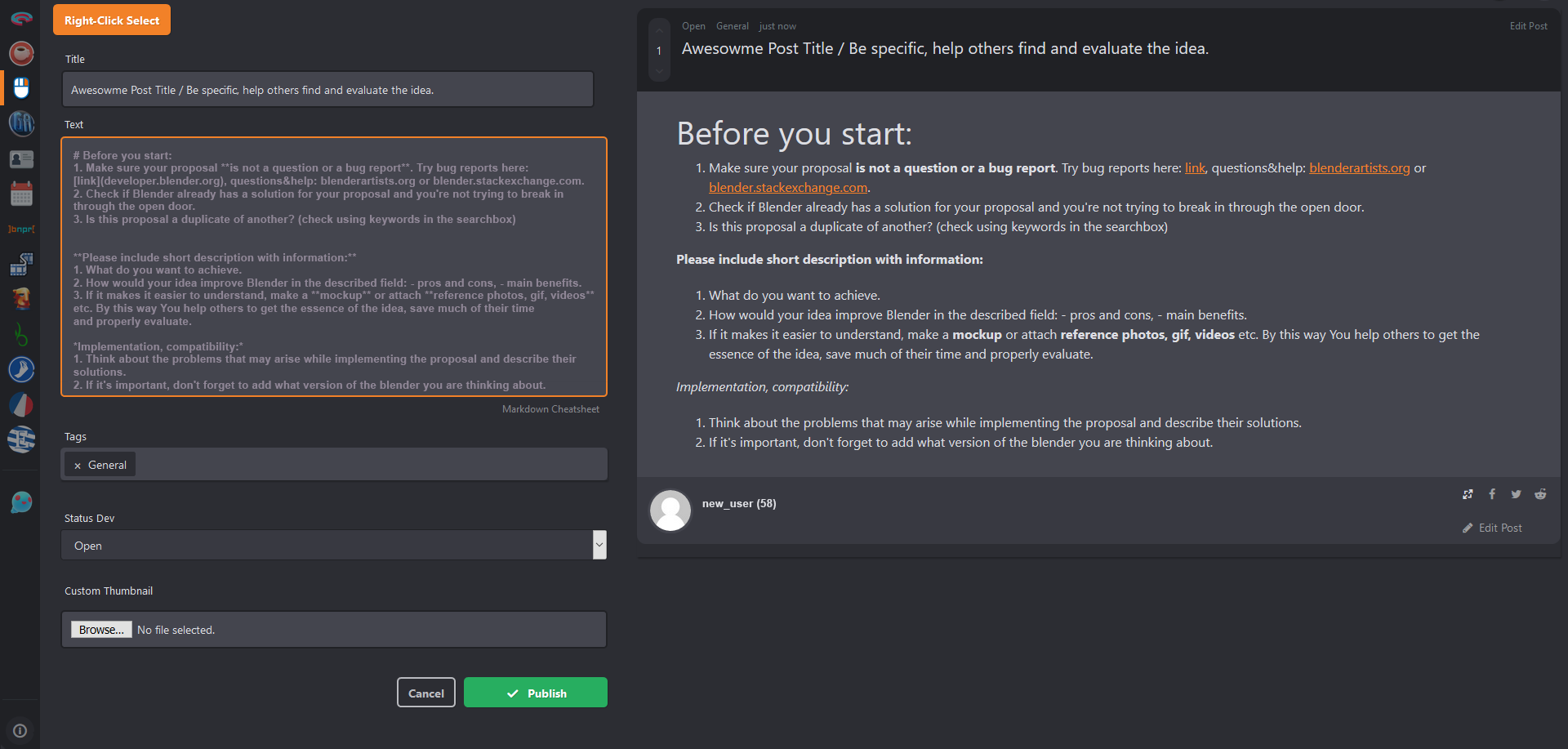
I suggest putting some actual for the moment guidelines in the proposal text box (pre-fill text or whatever, you name it :) ) maybe with optional text formatting elements. So that every new user who arrives can immediately hit the right place with his idea or question, etc. in the best way and save all around valuable time. After clicking on the text box and typing anything the guide text would disappear as normal.
It's also about helping new users find their way into the Blender community. Blender users are probably people who are looking for and finding solutions, and it would be nice to show new users a similar approach. :)
Mockup below and a sample text here:
Before you start:
- Make sure your proposal is not a question or a bug report . Try bug reports here: link , questions&help: blenderartists.org or blender.stackexchange.com .
- Check if Blender already has a solution for your proposal and you're not trying to break in
through the open door. 3. Is this proposal a duplicate of another? (check using keywords in the searchbox)
Please include short description with information:
- What do you want to achieve.
- How would your idea improve Blender in the described field: - pros and cons, - main benefits.
- If it makes it easier to understand, make a mockup or attach reference photos, gif, videos etc.
By this way You help others to get the essence of the idea, save much of their time and properly evaluate.
Implementation, compatibility:
- Think about the problems that may arise while implementing the proposal and describe their solutions.
- If it's important, don't forget to add what version of the blender you are thinking about.
The text is only a sample because probably admins know better what it would really be useful to include as such pre fill text guideline.
5 Comments
This voting forum does need to become more like a tracker, indeed. Having a system like this both here and in the tracker would make complete sense.
Deleted post...Hm...
This is basically a duplicate of this proposal . Yes, it's worth doing. It just hasn't been done yet.
I'd also like to treat the Subject field as a search field.
* @Jason van Gumster * Not quite but okey thanks :) I thought of it as something temporary, easier to do quickly before someone finds time to do such a template.
* @Jason van Gumster * Also close to This One