
Highlight override of bevel weighted, crease, mark sharp, seam edges
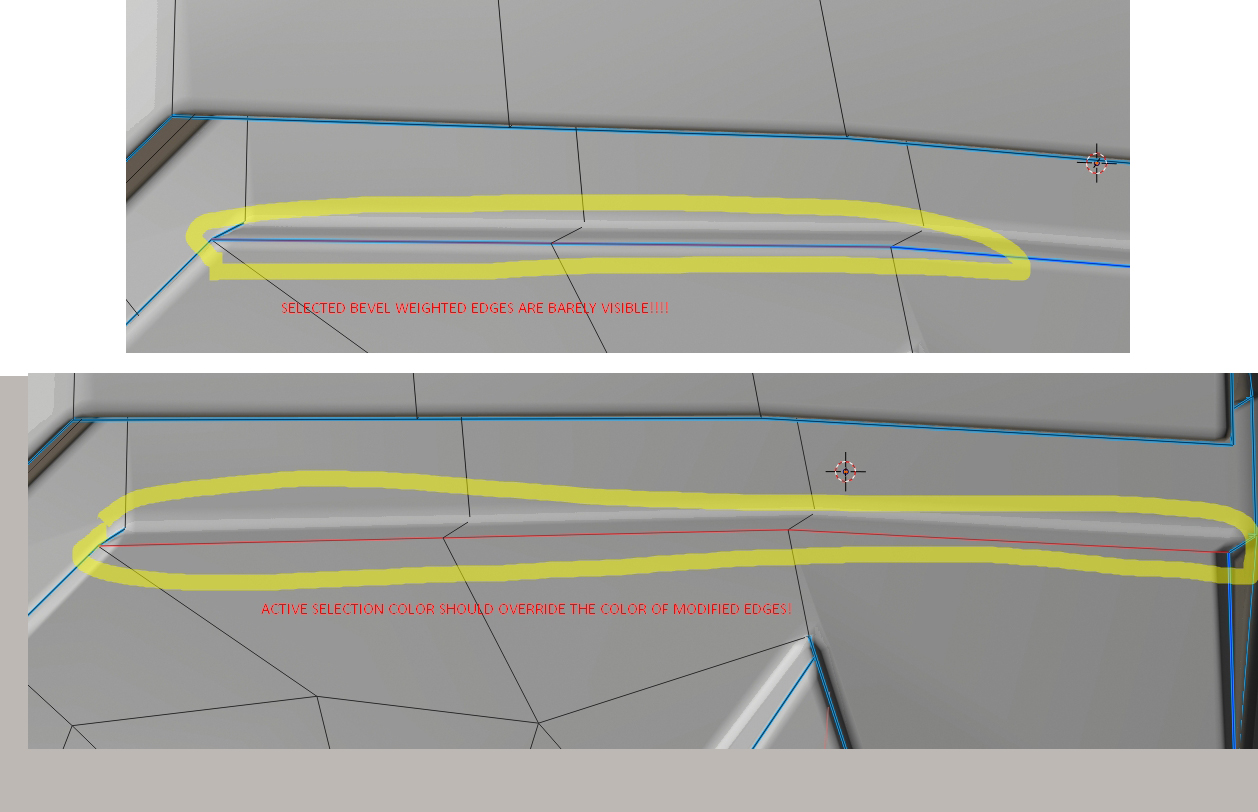
Hello! I have a problem seeing selected edges when the edges have bevel weight, crease or seam edges values. When the edges have values of crease, bevel weight and you need to select them it's getting really hard to select those edges precisely, most of the times selection is barely visible in both solid and wireframe modes and this is not a theme color settings issue.
In the screenshot attached to this message you can observe the following situation:
- I have red as my active color for selected edges and deep blue for active selection for face, edge, vertices.
- Bright blue color has been set up for mark sharp, mid-blue for bevel weight, purple for crease and green for seam edges.
- As you can see from the screenshot whenever the affected edges are selected, the edges with edge bevel weight, mark sharp override the color of selection sometimes almost completely, making your selection barely visible.
Proposal:
- Make selection of bevel weighted, crease, mark sharp, seam edges overridable by users selection to make everyone's life easier. Thank you!
9 Comments
How about already proposed this one?
* @IIIFGIII * Oh, well... Still was worth a shot, lol. =))
Do you mean you cannot see the white highlight on the active object? Because it is visible in my computer. What version are you curently using?
* @johnpdelacruz26 * I'm testing every new experimental blender version these are from last Blender version. No, the problem is not with the highlight the problem is that edges with bevel weight applied overlap the selection color no matter what colors in the theme you have, making it really difficult to discern what edge has been selected as your selection does not override the color of edges with modified values. This is particularly annoying when you want to precisely change bevel weight on some edges and have a dense model, it is becoming almost impossible sometimes and all you do is rely on your lucky precise clicks. This should not happen in my opinion and selection should always override any existing color marking on edges so that user will always have correct feedback from selection.
* @Chingiz Jumagulov * yes, there is should be dashes or something like this. Now with a proper theme and no antialias there is still not so visible.
The problem is edge can have so many states. {attachment 8153453jpg}
Partial solution is to switch only for 1 overlay (bevels or crease or sharp or seam)
* @ Vyacheslav * Exactly, selection sometimes barely visible. Selection should completely override the bevel weight or at least change the overall visual state somehow, dotted lines would be nice too, not just mix two colors together making it super hard to discern.
* @Chingiz Jumagulov * lets imagine system, that will allow tu show few states of edge. Full override is bad, when you want to use some marked edges. Cursor is about 20x20 pixels, so ~15px is minimum edge screen-lenght to operate with precisily. And we shouldn't forget about ppl, who want to use antialiasing in edit mode, so one dash should be longer than 3-4 px. Dots aren't good, they should not to mix with vertices.
May be something loke this: bevel as crosshatching (as it adds width). dashed lines on both sides with different phase to prevent em to mix as long as possible. Two types of dash on one side will mix colors 1 to 1, in case of three types 1 to 1 to 1
{attachment 8204016jpg}
The problem, that edge start to look very bold, So may be just 1 side with long dashes and another side with shorts. At list such system should allow to see clear two marks and selection state. For example bevel+sharp or sharp + seam. Anybody use 3 types of marks together? Like seams, sharps, creases may be?
{attachment 8213325jpg}
* @ Vyacheslav * That is why I propose to have an option to override it with selection color. Nice and simple. But the idea to implement it in stripes or something like that is great too.