
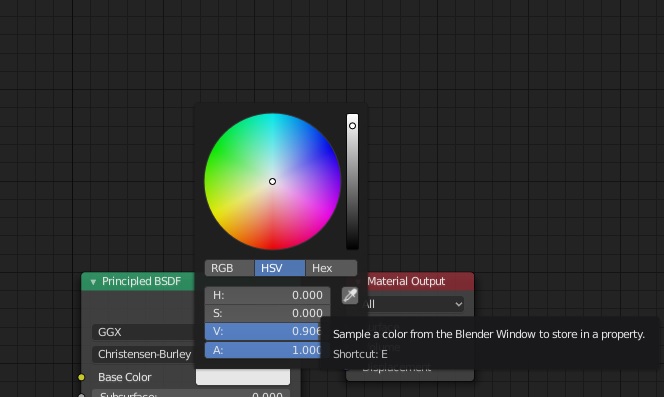
RFE :: Eyedropper (Color picker menu) to sample a color value from outside the Blender window too
UPDATE - Marking this post as DUPLICATE of this older post from 3 years ago
Hi Blender Dev team,
A quite handy feature making the Eyedropper much more useful would be to enable it to sample a color value from anywhere on your computer screen (outside the Blender window too).
During texture painting or while creating NPR scenes/pixel art, this feature would be super useful for quick color swatch and color palette prototyping.
This feature increases the utility of the eyedropper in any color picker menu and makes it easier for artists to quickly sample colors from any website, any image or any pixel displayed on the monitor and would be bound by the default colorspace rules of that monitor.
You could have the user, press ALT + Click on the eyedropper to sample from anywhere on the screen or just default click to sample from within the Blender window.
This simple feature would be quite useful for artists reducing prototyping time and thereby enhancing the current Color Picker menu experience and capabilities in Blender.
Thanks.
15 Comments
UPDATE - Marking this post as DUPLICATE of this older post from 3 years ago
Substance painter can do this and it is one of the most useful features of Substance Painter.
There is a technical difficulty in implementing this feature. Blender's entire interface is drawn and modified in OpenGL. This provides a lot of advantages in the interface that other applications don't enjoy... but there's a trade-off, of course. One of those things relates to color picking. Its fairly easy to figure out the color under the cursor within an OpenGL context. All of the color management tools are already there and baked it. It's much more difficult to grab colors from outside that context. Otherwise, this feature would likely have been added a long time ago.
* @Jason van Gumster * I finally found the app that didn't have this problem, it was Maya, lol.
It also uses OpenGL but I guess it's only for the viewport and not the entire UI like Blender because the color picker works everywhere. I'm not a technical person so I really have no idea how it works.
So sad this feature is too difficult to implement. It's a small thing, but all the little issues combined can make Blender annoying for new users who aren't used to the pain yet.
* @Armored Wolf * FWIW, it's not impossible to do. It's just not easy. ;)
The way I've seen this work in other apps is to click and hold down the eyedropper tool so it starts to sample colors... but then drag it off screen. Maybe it could work the same way in Blender.
It's really anoying to do that with tablet stylus.
* @-L0Lock- * You gotta elaborate a little to further the discussion.
Elaborate what ? I'm telling you a fact : it is really anoying to drag offscreen with a tablet stylus.
* @-L0Lock- * Facts also have explanations. Don't take my question personally, we both wan't blender to improve. I was simply hoping you could elaborate (not just for me but for everyone who might read this discussion) why dragging on a tablet might be undesirable.
I thought the claim was strange since the most common usage for tablets is making strokes (dragging).
I most definitely believe there are better methods for color picking, but that's why I wanted to hear your opinion. Just saying "no I don't like that, its a fact" just adds noise to the proposal.
The thing is: most of the time, the tablett only covers the area of one screen (if no a small fraction). That's how it is the most efficient in most cases and how it is by default. It doesn't allow you to go offscreen right away. You would need to do either one of these:
* @-L0Lock- * I see how multi monitor users or anyone who maps their tablet to a portion of the screen might have a difficult time holding and dragging the eyedropper outside of blender to wherever their reference is located.
The hold and drag is a hack still used in Photoshop today I believe, since the eyedropper switches back to the windows cursor when outside the application (I wish it didn't work that way), but I remember using other apps that didn't have this problem, so I'm confident the Blender developers can get around it as well.
Ideally, once the eyedropper is enabled it should stay active anywhere on your screen until you click somewhere (no need for special hotkeys or anything fancy).
Unfortunately, multi-monitors users will still have to figure out how to navigate all the way to their external reference.
Upvote !
Until now I always had to either screenshot something & import in the Image editor & then use the eyedrop, eyther use an external eyedropper software. Both things are extra work. And boring.
Have you tried bringing whatever you wanted to sample into blender's image editor? If the color is a part of your user interface, you could screenshot it.
* @itsalightspeedlife * Yup, tried that. However, this post is a feature request which would enhance the Eyedropper functionality and make it even more user friendly :)