
Keep Viewport Axes on Operation (or Maybe Add New)
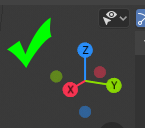
On any operation (grab, rotate, scale etc etc) the viewport axes disappear, and I'm always backing out of the operation to check which way I'm going.
It would be nice to keep it in place, and/or add a second axis that defines the transformation orientation (local, global, etc)
This idea was marked as a duplicate of Don't hide the gizmo during Grab/Scale/Rotate.
7 Comments
This task will fix it: developer.blender.org/T63743
* @TheRedWaxPolice * Looks like there's no man power to accomplish that. 🙁
* @TheRedWaxPolice * in this thread is about transformation gizmo not viewport gizmo, i prefer dont hide the viewport gizmo
* @Salvador Garcia * look closely, it's the same issue. once done it will fix everything.
This is a duplicate of the proposal I made a little while ago: blender.community/c/rightclickselect/0jfbbc/ which was, in turn, a duplicate of this proposal: blender.community/c/rightclickselect/BNcbbc/ Let's bump this one up the priority order; seems popular!
:) I notice that it disappear only after reading this... Maybe it because I never need this to be visible while transform. But yes - why it go away is a good question. Maybe because while transform you see new overlay with transform values.... But I think those two overlays can live together.
Maybe better to go with this request right to devtalks UI paper cuts.
Yes this is something that have annoyed me from time to time, would be nice to quickly see which axis X or Y is when I already pressed G or so.