
Blender 4.0 is HUGE! - Blender Today LIVE #235
Changelog
418 commits in total, of which 89 are fixes and 123 cleanup.
Animation
- Anim: move bone colors from bone groups to individual bones - Sybren A. Stüvel
- Anim: replace Bone Groups & Armature Layers with Bone Collections - Sybren A. Stüvel
- Anim: add custom property support for Bone Collections - Nathan Vegdahl
- Animation: Shear operator for Graph Editor - Christoph Lendenfeld
Armature
- Armature: apply new DualQuat scale handling to constraints and crazyspace. - Alexander Gavrilov
Camera
- Camera: Move panoramic projection settings to DNA - Clément Foucault
Color management
Compositor
- Compositor: Refactor Add menu - Pablo Vazquez
- Compositor: Re-organize Add menu - Pablo Vazquez
Cycles
- Cycles: Match Eevee when processing ramp/camera curves - Jesse Yurkovich
EEVEE
- EEVEE: change Glass BSDF to match Cycles - Weizhen Huang
- EEVEE: change Principled BSDF to match Cycles - Weizhen Huang
Geometry Nodes
- Geometry Nodes: Points to Curves node - Iliya Katueshenock
- Geometry Nodes: Move tool-specific nodes to proper menus - Hans Goudey
- Geometry Nodes: Initial basic rotation socket nodes - Hans Goudey
- Geometry Nodes: Support drag & drop for Materials - Daybreak
Keymap
- Keymap: Left and Right Click consistency improvements - Julien Kaspar
- Keymap: improve tweak tool consistency & behavior - Campbell Barton
Mesh
- Mesh: Share normals caches by splitting vertex and face calculation - Hans Goudey
- Mesh: Parallelize vertex and edge to corner topology map creation - Iliya Katueshenock
- Mesh: Rewrite split edges algorithm - Hans Goudey
- Mesh: Add three cached topology maps - Hans Goudey
- Subdiv: Use index instead of pointer for grid to face map - Hans Goudey
Node Editor
- Nodes: Panels integration with blend files and UI - Lukas Tönne
- Nodes: Remove "Make Group" and "Ungroup" from add menu - Hans Goudey
- Nodes: Change rotation socket color - Hans Goudey
- Nodes: Move rotation socket out of experimental - Hans Goudey
- Nodes: Move Auto-Offset toggle to User Preferences - Rawalanche
- Node Editor: show auto-attach status while moving - Philipp Oeser
- Nodes: fix Voronoi Noise discontinuities when Lacunarity is 0.0. - Hoshinova
PyAPI
- PyAPI: support building with the up-coming Python 3.12 - Campbell Barton
Shading Nodes
- Shading Nodes: Refactor Add menu - Pablo Vazquez
Snap
- Snap: Show different symbols for different types - Germano Cavalcante
UI
-
UI: Fix scrollbar highlighting outside of regions - Guillermo Venegas
-
UI: Statistics Overlay Improvements - Harley Acheson
-
UI: Move asset shelf out of experimental - Julian Eisel
-
UI: Rename Realtime GPU in compositor to GPU - Eitan Traurig
-
UI: add a preference for the number of samples used for FPS playback - Campbell Barton
-
UI: Object Types Visibility Popover Tweaks - Harley Acheson
-
UI: Allow eyedropper outside of Blender (X11) - Vitor Boschi
-
UI: Node Grid Adjustments for Line Width - Harley Acheson
-
WM: improve timer precision for more precise playback - Campbell Barton
-
Viewport: show fractional FPS playback values - Campbell Barton
-
Viewport: Add toggle for edit mode overlays fresnel - Gilberto Rodrigues
-
UI: Rename and reorder group operators in Node Editor menus - persun
-
UI: Header Status Text Changes - Harley Acheson
-
UI: Theme Editor: Sort widget colors alphabetically - Pablo Vazquez
-
UI: Theme Editor: Mention editors that share settings - Pablo Vazquez
-
UI: Theme Editor: Align relevant columns and simplify labels - Pablo Vazquez
-
UI: Consistent Menu/Block/Popup Content Ordering - Harley Acheson
-
UI: Slight reduction and centering of UI_BTYPE_SEPR_LINE - Harley Acheson
-
UI: Highlight Selected Enum - Harley Acheson
-
UI: Improved Enum Title Determination - Harley Acheson
-
UI: Minor Changes to Topbar Edit and File Menus - Harley Acheson
VSE
- VSE: Sound equalizer modifier - Marcos Perez
Viewport
- Wireframe color option for all shading modes - Gilberto Rodrigues
Workbench-Next
- Workbench-Next: Enabled by default - Miguel Pozo
- Workbench-Next: Workaround lack of texture views support - Miguel Pozo
- Workbench-Next: Support multiple samples for Viewport Image Render - Miguel Pozo
16 Comments
Hiya pablo, this might be the first time I've ever caught the show live! Last year there was a GSOC project titled "Soft Bodies Simulation using Extended Position-Based Dynamics (XPBD)". There seems to be some talk about this on the dev forum, but I feel as if it is difficult to find an authoritative answer regarding the progress of this solver + tetrahedralizer. Is there anything you can share on this front? Is the project still alive, or has it been canned? The GSOC was dedicated towards softbodies, but considering XPBD can be a multi-solver, could we ever expect this to replace the current blender bullet library? Are there any other solvers or libraries the team is looking into? My heart yerns for the day I can do realistic layered (muscle, fat, fascia, skin, and fur) creature simulation in blender. Thanks to you and everyone at the blender team for keeping the dream alive.
YES TO THIS! I was eagerly tracking the XPBD threads on the dev site and was sad to see it suddenly flatline :'( From what I've been told and managed to gather, the devs are holding back on implementing any physics solvers until Geometry Nodes reach a point where the solvers can be added as nodes, like how it's done in Houdini. So until then, XPBD is on hold, but will be added :')
Hi Pablo, thank you for the Blender Today streams! I come from another 3D software and have been working in Blender for some time now. I don’t regret my decision to switch to Blender yet. But there are some little things that seem a bit unhandy to me. One of the things I struggle with most is that I can’t sort the elements in the outliner in a custom order (like you already can do with the collections). I read somewhere that the outliner is being rewritten at the moment. Are there also new features coming to the outliner, like custom order? Like in this proposal: blender.community/c/rightclickselect/1Xcbbc/ Thanks!
@Pablo Vasquez I was a little late catching the show Live today. I wanted to suggest something for the Toggle Region Pie that you started discussing, roughly at the 40 min mark. It would be a great addition, to have two additional selections in the Pie Menu:
SHOW ALL
DISABLE ALL
This would be nice when doing a meeting with others, and you want to instantly make the screen less cluttered, and be able to switch back and forth to make adjustments, or use specific tools.
Perhaps another option could allow an "AUTO HIDE" option, where they appear when the mouse is near one of the toggle-able UI elements, and hide when the mouse leaves the area. (Time adjustments set by the user would be a nice touch, but not entirely as necessary as the other features I mentioned.)
I would welcome a presentation about "Project Gold" and the Kuwahara filter use for more 'artistic' look to the render completed.
Hey Pablo, Hope you are doing great, your hair loking awesome as usual...
As you know the blender is spreading in the India like a wild fire and we have a 2nd largest population in the world and the population is 60 % youngsters
I being moderately smart could some how do a donation using paypal after a lot of hassel and the crypto is also a hassel for us
So it would be great if you implement "UPI Payments" option for BLENDER DEV. FUND so that it will be easy for us to donate as easily as we can... i would request you to consider this option please
Even wikipedia implemented the UPI PAYMENT OPTION for their donatin drive... So please consider this...
Hello, is there any plan about Principled BSDF NODE V2?
Is there any chance we'll get collections and drop and drag for shape keys and vertex groups?
Hi Pablo! Did You see Blender ripoff 3IXAM? 3ixam.com/en
Hi Pablo! Are there any plans to improve the weight painting workflow?
Hi Pablo! First time posting here, but I’ve watched your live streams for a couple years now! Hope you’re doing well.
I’ve been curious about real time compositing, and when it might be usable in the imageViewer for use in general purpose compositing. Having it usable in the viewport is great, and I use it all the time. But when using blender as a composite only project, I would expect real time comping to work in that workflow using the image viewer as well. Any info if that is coming?
Hi Pablo . I have questions about snapping - In Blender, there's an option for snapping with rotation, but it doesn't take into account the rotation of more than one object or vertex that's selected. When I use the snap tool (shortcut A) to snap more than one element, for example, two vertices, the resulting rotation of object Z should be halfway between those vertices, but that doesn't happen. Is there a possibility to set a common rotation between selected vertices, faces, or edges? Each of these elements has its own rotation in Z, X, and Y. It would be great if when snapping to two opposing vertices, the object's rotation would be the average of the selected normals for snapping. If snapping with rotation to a face takes the object's alignment into account in the Z-axis, there should also be a way to have a common rotation between more than one selected element using the A shortcut. This would make aligning and rotating objects in relation to other objects much easier. Best regards.
Hi Pablo, is there any news regarding VR in Blender, if im not mistaken there was a developer working with Daniel Lara on it no? The best option i have seen so far is FreeBird XR, but it would be great if the Blender institute would support the dev if there is no one working in implementing VR functionalities yet.
Hi Pablo !!
Why is the selection mode isn’t consistent between the different areas in blender ? For exemple, selection in Outliner for picking shortest path is SHIFT keymap and, on the other hand, with CTRL on mesh editing.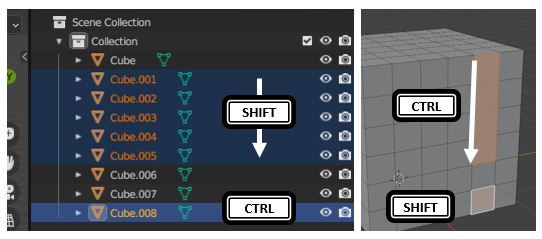
Can Blender use, by defaut, SHIFT for picking shortest path and CTRL in order to add to the selection anywhere as the others softwares do, such as file selection on Windows and Linux ?
Hola Pablo, saludos desde Madrid:
I've seen that node operators are in experimental now and I was wondering if the team will include a few examples inside blender like they did with the hair nodes, they could be really useful to retopo or to scatter objects with the freehand curves, to expand the filters, to add more physics simulations to brushes in sculpt mode etc...
Hi Pablo! Can you take a look at this: i.imgur.com/gFmupce.png