
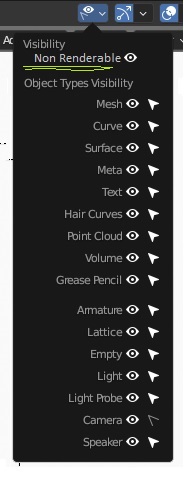
Add feature for 3D view to hide objects that have their render visibility turned off.
I think it is essential to have viewport feedback on what is going to be rendered and what is not. It will be very useful when the render visibility is animated. As of now the non renderable thing will still be there obstructing the view in some way and has to be moved off camera and its position keyframed.
An option in this menu would be nice.
9 Comments
There are already some good proposals for this visibility linking autodesk style.
That's nice. I didn't find any duplicates here though.
I know the search is not very smart but here are some related ideas:
blender.community/c/rightclickselect/7Kdbbc/
blender.community/c/rightclickselect/cZgbbc/
Lol. Both more than 2yrs old and with 30+ upvotes. I will lower my expectations. Still, my suggestion looks better to me cause its on a per-viewport basis rather than a scene-wide setting via outliner. Also this menu is where I think someone would expect to find it.
"As of now the non renderable thing will still be there obstructing the view in some way and has to be moved off camera and its position keyframed. "
So hide it in the viewport...?
Please give more details on your request, as the outliner already provides a visual cue on what is visible in viewports and rendering; ie, you can already turn vis on/off, so I don't understand how this isn't fulfiling your needs.
I assumed it was self explanatory and was something Blender users struggled with cause it was possible to animate the viewport visibility in very earlier versions using layers I think. After the feature vanished, someone even made an addon to sync render and viewport visibility. The addon is not for Blender 3.x though. I think this should be a built in feature.
How is this useful?
Imagine I am animating a toy being magically unboxed. At some point I set a keyframe for the box to be hidden from the render from that point onwards. Now in the viewport I would like to have the box be visible before and hidden after the keyframe just like it would be in the render.
With this feature. I can work on the box and the toy inside without having to hide/unhide everytime or moving it off camera. Also useful if I am doing a viewport render for preview purposes.
There is only one box in my example. There could be many such obstructions in another scenario and these things might be getting hidden from render at different points in time. Things can get maddening really quick.
Your followup explained it perfectly - now i see understand it more. Thanks for taking the time. :)
You can disable the overlays:
Or disable parts of them as you want.
Oh no that's not what I meant. I think I should edit the post to be clear. I am talking about the objects that have their render visibility turned off.