
Option to Sync Viewport and Render Visibility
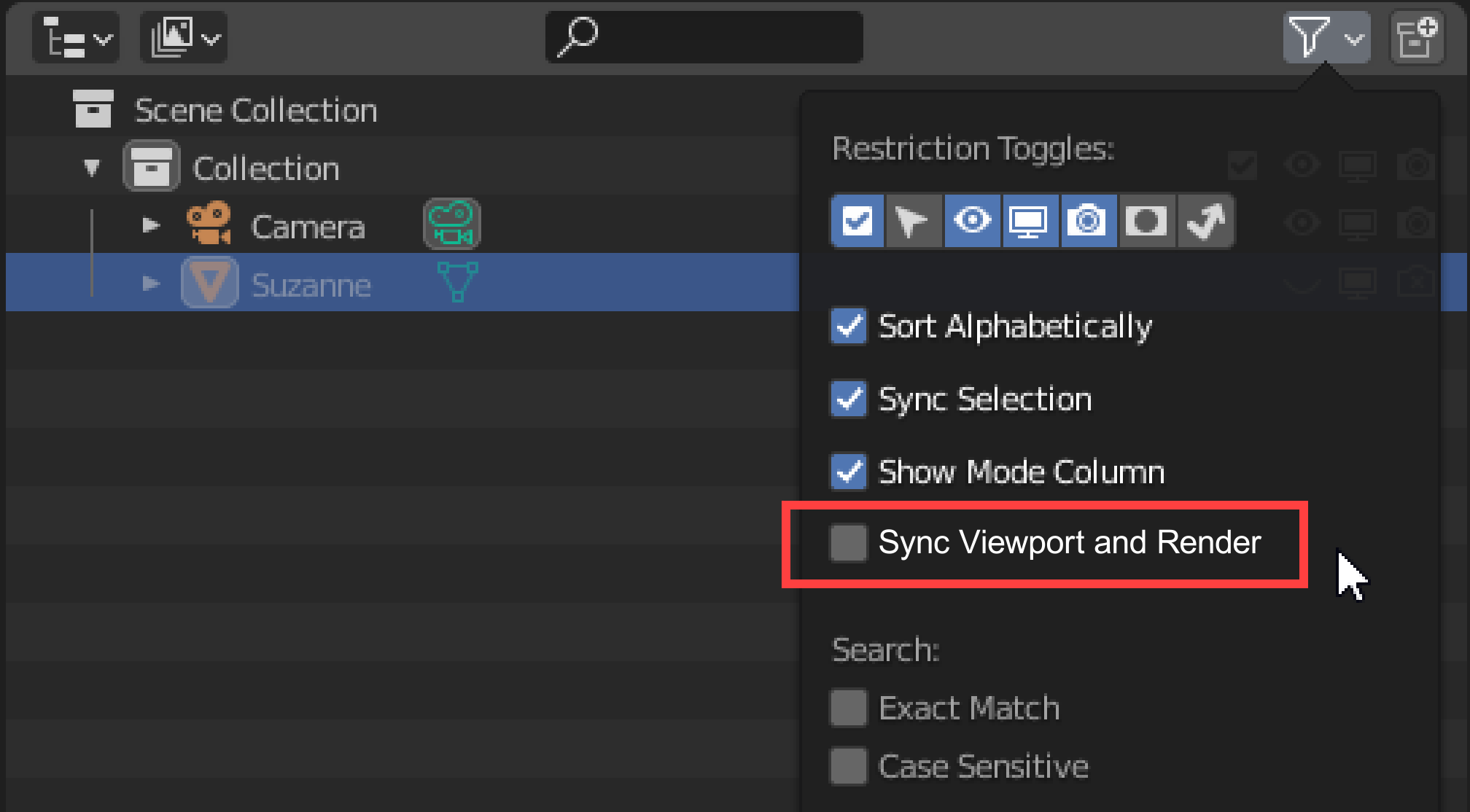
I'm aware of this , I'm just proposing a relatively simple way to solve it. Under Filter in Outliner , add a checkbox that would sync Hide in Viewport and Disable in Renders (eye & camera icons).
Reasons:
- Many of us are always disabling objects in both viewport and render, 1 useless click.
- Pretty much everyone has accidentaly rendered something that should have been hidden.
Ideas / questions:
- When turned on, Disable in Renders should probably be changed to match Hide in Viewport (warning?)
- Maybe the Disable in Renders icon should disappear altogether with this checked on.
- Should Blender remember the original values when user turns it back off?
Or perhaps even better, the proposed behavior could be default and the option would be to separate the two.
This idea was marked as a duplicate of Outliner - add option to sync viewport and render visibility state.
12 Comments
Yesss please, I've been trying to bring this up since 2.8 alpha we should bring back "Show only render" toggle in viewport panel or something
Its hard to count how many times I had to re-do renders because I forgot to turn something off
I was just going to make a proposal for this :) My idea on how this should work is :
-Viewport and Render in sync at all times
-keep and use the Renderable toggle as an override for special cases.
This Views sync + Render override can be introduced as a Preferences\Editing option or in the pannel from this mockup. It will be also completely compatible with the current logic and it will not affect the already made settings. What is changing is just the way you set the on/off values.
I believe some will prefer the engineering "correctness" of the actual implementation as two distinct parameters are controled sepparately but from the ergonomy PoV this proposal seems better.
* @Ge Ro * Ah, cool! :)
Yeah, there are couple of ways to do it, but it absolutely should be there in some way. Quality of Life improvement.
I'm just trying to figure out how the override would work. Maybe a nice way would be to have a 3 way toggle:
But that would be a bit inconsistent, so Idk. Although I agree that the syncing should be default, I was just trying to propose something (hopefully) easy to implement.
* @Vladislav Macíček * Yes, I forgot the dreadfull Three Toggles Problem.:) Unavoidable if you want per object control. Now I understand why you picked a global switch. Then again I'd like to see an indication that this is active and the state of the render toggles when I need to cancel the sync and revert to original states. Which seems to hit the same issue of a disabled boolean toogle. I would speculate that the developpers would not settle for just a quick change on this.
Upvoting this.
If any developer is reading this comment: Are there any technical/architectural limitations that are preventing this from being implemented?
I don't like the idea of losing information that would be caused by this synchronization. I would rather a setting be in the "Scene Rendering Settings".Keep in mind: <i>Hide in Viewport</i> only effects your current <i>View Layer</i> and <i>Disable in Viewport</i> effects all <i>View Layers</i>. So: In order to render by the <i>Hide in Viewport</i> option, you would have to specify which <i>View Layer</i> to read that property from.
Also: <i>Hide in Viewport</i> is not animatable while <i>Disable in Viewports</i> and <i>Disable in Renders</i> is animatable. i.imgur.com/wUHrV55.png
I use addon keKit and it have tool 'Render Visible', can be assigned to Shift+F12. Or this mini addon (second answer) from stackexchange that sync view and render but need to click icon every time before render.
* @Eugene D * Thanks, Eugene! The second one works great for me.
I think the easiest solution would be to add "CTRL Click to modify both." Click either while holding ctrl and it will switch the one you clicked, and make sure the other is the same setting. Easy peasy.
Yes! Please! I would only add that Disable in Viewport be synced, and not Hide in Viewport, because the later cannot be keyframed. I end up making drivers for every object so that Disable in Viewports drives Disable in Renders. It's a tedious solution, but necessary when rendering complex scenes with keyed visibility. I'd love to hear the logic behind the choice of making 3 visibility toggles when only one of them actually effects the render.
It's so depressing that this post is 3 years old and nothing has been done to solve this issue. It's enough to make me want to render in Maya again!
Doing lots of technical illustrations I like to be able to see in viewport what I'm about to render purely because I need to switch hundreds of objects on and off for each illustration or model configuration. It's annoying if the part is hidden in view but rendering, because you can't click on it to locate where in the outliner it is to toggle the render icon.
This has frustrated me too, I wrote a simple add-on that adds an operation to the 3D view context menu to synchronise Disable-in-Viewport to Disable-in-Renders for all selected objects. There's another button to make the object always visible again. This means you don't have to keep pressing a button to synchronise the state, and you can easily get back to seeing everything. You can select everything in the scene and synchronise everything at once. github.com/lexbailey/blender_sync_hide_viewport