← All ideas30 Oct 2020nicknrollOpenGeneralModelingnicknrollAcideRominéBlenderheadXYZDITDangryDarknoodlesDraiseGlacialClawGluhachev.designHologramIIIFGIIIKdafSPYReoxShimoonThane5albertdeariasandyp.123antoinebagacamplowellcorvoredanielrobnikdariomoreddudcb.creativedenishulenkoezeez2104francis.teslagjowen2255justastatuekolovedlacina.vojtechlsscppmodormodernunoalexconceicaoperludumradi0nreanimatereguza64runesandmor1220seragyugi2016slowk1dsqeeetesturev.imran2018wxz18883234348you16.823
*
@nick
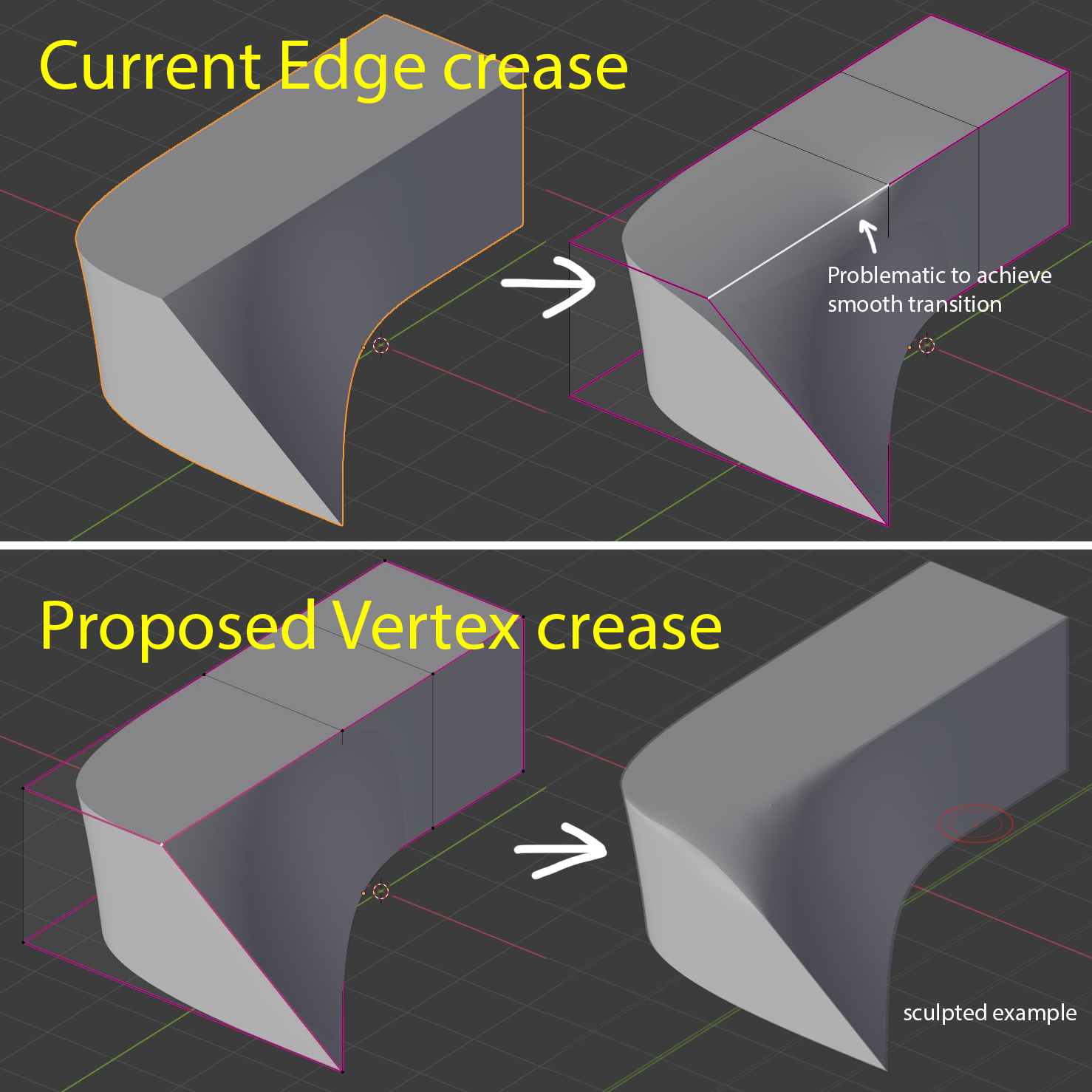
* I get your point. It's like about advanced edge "weighted " crease. In some case it even better way than just vertex crease - your example can't be achieved with just vertex crease (it will sharpen all connected edges ).
What you propose is some sort of operator to set edge side which have more crease weight than other as I guess. Something look like slide, so you move some indicator to one of edge vertex to set it's weight (up to 0/100).
2
n
nicknrollAuthor
*
@IIIFGIII
* Thanks! Yes i know that, sculpted example made with divided edge, but
it breaks geometry. Main goal of Vertex crease is keep topology stay clean.
I
IIIFGIII
*
@nick
* My problem was in title. I thought that it's just " another one ". But this idea is different. If it have to work as I describe or close - it is not exactly vertex crease. It's sort of advanced per edge crease parameter.
Would be nice to have some visual indication like this. Arrow show which side is more weighted and position indicate how much.
2
n
nicknrollAuthor
*
@IIIFGIII
* Good idea, i thought it could be implemented with mouse, like in the edge slide, when you just move mouse at necessary side.
Or there could be even more intuitive approach, first you add crease for the edge, then decrease at necessary vertex.
I
IIIFGIII
*
@nick
* It may work via key modifier like in bevel - press
P
to switch set profile and
P
again to switch back to bevel.
So user press
Shift+E
to change crease and may press modifier key to switch mode to vertex weight adjusting + some maybe
Ctrl
key for incremental snap.
And it can be merged with just vertex crease feature. By default such feature change vertex weight affecting selected edge ( not touch other connected edges) but with some additional key (
A
?) user switch mode. Now it change weight for vertex which belong to edge + affect same edges connected to vertex with less weight ( or on both sides? ). Such alternative mode may work perfect for cone example case.
1
n
nicknrollAuthor
*
@IIIFGIII
* i guess we need to ask this feature with your examples at dev forum, not sure they read RCS :)
I
IIIFGIII
*
@nick
* " They " read this maybe sometimes if it somewhere on top with 100+ votes. Most of stuff here stay years in " no one care " status. I sitting here for hobby and to practice English...
n
nicknrollAuthor
*
@IIIFGIII
* I see here a lot of 100+ votes topics for years without any attention.
But here is an issue -
actuall sugeggestion is not about such "SPIKE like" vertex creases
but about ability to manipulate level of Edge Crease influence. This Vertex Creases implementation still not solve issue described in current suggestion in any way. Please check actuall suggestion images/my comments/mockups again...
Hi Hello I`m back from trying to import creasing from other software and the question i have is please introduce "Face Corner" creasing. this wil simplify everything for everyone.
Especially when working with multiple softwares.
t
tanghe
Hello I`ve been trying to import the vertex (actual vertex not point(plz also fix this nomenclature))
crease weight. from houdini.
the data doesn`t show up annywhere. Does annyone know more about why this nmight be and how to get arround this ?
m
mrajendra2150
I think it is not the problem of crease but the improper mesh planning (extrude the new face for this thing and adjust it).
If in case they implement vertex crease then how you will crease the vertex in order to achieve such result.
Also the method of sub division (given by catamul and Clark) work on the basis of edge and edge flow not on vertex therefore i don't think it is possible to write a code for vertex sub division
n
nicknrollAuthor
Crease is just a range of numbers, so pretty sure there is simple math.
m
mrajendra2150
*
@nick
* If this was so simple then why blender only implemented Bevel data for vertices but not crease data.
1
n
nicknrollAuthor
*
@mrajendra2150
* Since 2.8 blender use OpenSubdiv which, as far as i know, support this feature

20 Comments
Search function for losers?
* @IIIFGIII * both describe different usage
* @nick * I get your point. It's like about advanced edge "weighted " crease. In some case it even better way than just vertex crease - your example can't be achieved with just vertex crease (it will sharpen all connected edges ).
What you propose is some sort of operator to set edge side which have more crease weight than other as I guess. Something look like slide, so you move some indicator to one of edge vertex to set it's weight (up to 0/100).

* @IIIFGIII * Thanks! Yes i know that, sculpted example made with divided edge, but it breaks geometry. Main goal of Vertex crease is keep topology stay clean.
* @nick * My problem was in title. I thought that it's just " another one ". But this idea is different. If it have to work as I describe or close - it is not exactly vertex crease. It's sort of advanced per edge crease parameter.
Would be nice to have some visual indication like this. Arrow show which side is more weighted and position indicate how much.
* @IIIFGIII * Good idea, i thought it could be implemented with mouse, like in the edge slide, when you just move mouse at necessary side. Or there could be even more intuitive approach, first you add crease for the edge, then decrease at necessary vertex.
* @nick * It may work via key modifier like in bevel - press
Pto switch set profile andPagain to switch back to bevel.So user press
Shift+Eto change crease and may press modifier key to switch mode to vertex weight adjusting + some maybeCtrlkey for incremental snap.And it can be merged with just vertex crease feature. By default such feature change vertex weight affecting selected edge ( not touch other connected edges) but with some additional key (
A?) user switch mode. Now it change weight for vertex which belong to edge + affect same edges connected to vertex with less weight ( or on both sides? ). Such alternative mode may work perfect for cone example case.* @IIIFGIII * i guess we need to ask this feature with your examples at dev forum, not sure they read RCS :)
* @nick * " They " read this maybe sometimes if it somewhere on top with 100+ votes. Most of stuff here stay years in " no one care " status. I sitting here for hobby and to practice English...
* @IIIFGIII * I see here a lot of 100+ votes topics for years without any attention.
Hi, vertex creasing is now supported. You can try it out in the latest Blender 3.1 Alpha build .
Thank you Kevin for your work, well done.
But here is an issue - actuall sugeggestion is not about such "SPIKE like" vertex creases but about ability to manipulate level of Edge Crease influence. This Vertex Creases implementation still not solve issue described in current suggestion in any way. Please check actuall suggestion images/my comments/mockups again...
Your solution solve this suggestions Crease vertices | Vertex Creasing | vertex crease weight and crease sets. .
I think Open Subdiv has those possibilities. It's by Pixar, free and sadly not implemented in Blender. See my proposition. blender.community/c/rightclickselect/lCgbbc/
Hi Hello I`m back from trying to import creasing from other software and the question i have is please introduce "Face Corner" creasing. this wil simplify everything for everyone.
Especially when working with multiple softwares.
Hello I`ve been trying to import the vertex (actual vertex not point(plz also fix this nomenclature)) crease weight. from houdini.
the data doesn`t show up annywhere. Does annyone know more about why this nmight be and how to get arround this ?
I think it is not the problem of crease but the improper mesh planning (extrude the new face for this thing and adjust it). If in case they implement vertex crease then how you will crease the vertex in order to achieve such result. Also the method of sub division (given by catamul and Clark) work on the basis of edge and edge flow not on vertex therefore i don't think it is possible to write a code for vertex sub division
Crease is just a range of numbers, so pretty sure there is simple math.
* @nick * If this was so simple then why blender only implemented Bevel data for vertices but not crease data.
* @mrajendra2150 * Since 2.8 blender use OpenSubdiv which, as far as i know, support this feature