
An Option to show Hidden line on Hidden Select
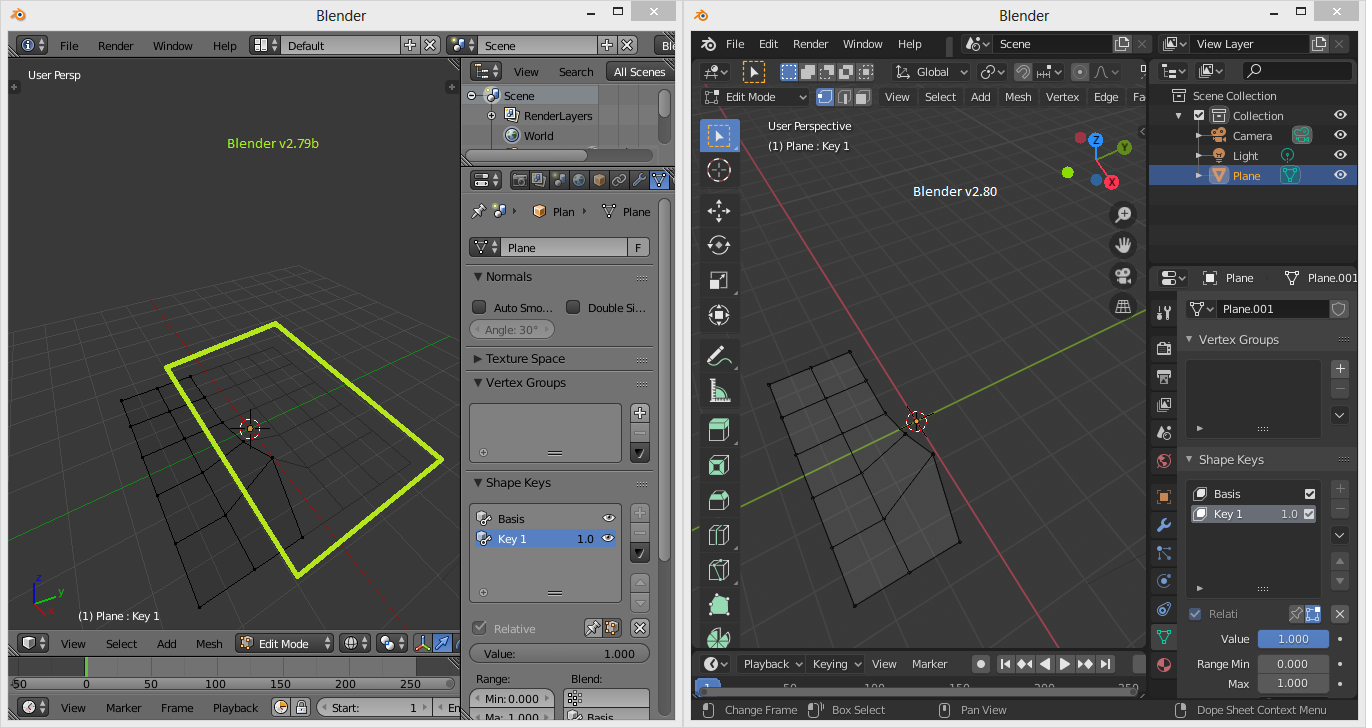
This was a bug feature from blender v2.79 and no longer in blender v2.80-v2.82. In v2.79 when adding Shape Keys with Apply shape keys option turned on, Areas within Hidden Select will be shown with a hidden line. This hidden line feature is actually pretty useful in previewing the effect of modified object without accidentally selecting any Hidden Select. With its unique effect, it would be nice if this feature could return as an option in blender v2.80+.
5 Comments
I just post here my suggestion about ghost mesh and using such ghosts for arrays . Maybe if it go into development somehow this suggestions stay close and can be implemented as parts of one new feature.
A simple example to explain why it is useful. It allows to operate on mesh geometry, taking hidden into account.
For instance, here part of mesh is lowered with proportional editing taking into account model's boundary. imagizer.imageshack.com/img922/1169/9wT7D7.png
A very common case in organic modeling.
It wasn't a bug
wow! maybe in prefs this option also should be presented as color with alpha of hidden polygons and edges?
* @impacman * Maybe. As some general solution. But I realize that such thing implementation mean lot of work. It may never be implemented because of " not priority ". I just pin it here for future.