← All ideas1 Jul 2020khaderDoneModelingkhader3DSinghVFXAndrewAnthonyGuiziouAslan3DBabaJanBelichBlenderSplendorBonesCandleCometDraiseEzyPolyFacuGluhachev.designGooneyIIIFGIIIImportantLookingPirateIneCmbJoeRexKaglavrLauloqueLillyaLuis.BurdalloMajestyManBlenderMrJomoOrphydianOskarPszichiátriaRockbardRyxxShimoonSymstractWiresoulStudioaabranyafranxalan.zirpoliammusionistandergrinanderson.omoriangelbpinedaapex.kumaran7ar.gdipeshart.skechbelimlinbestelixbetmenbillyjonsmithbintangsenjapratamablenderUser0803bnzscmykcatcsveendanielpaulus90davidwallmann83ddinhddoongdemonrookdenishulenkodima_s_a93dimitarekz0627emil.assarssonfbcrenshaw91felipetorrentsferranmartinezclarfrancesco.azzurlifrederico4dgotolifewaygulicmanojlohanguyenhemdruphponcejjerzy.gorski.artjonjon.schrothjulien.kasparkaamalauppiaskarpiCzkotulskykram1032kristian.emillopoisaaclsscppluja19m00kmanuelgrad.atmarcel.quintasmarcusmasinisa89mastakiramatt881maysamfakhari77michele.bedendomikko.rantalainenmikkomarjamakimistajollymnproductionsmomotron2000mviteganisonunoalexconceicaoorcaviapaulklingbergpawellyczkowskipelminatorperludumpetr1rabatin.dominikradi0nrawalanchereanimateristo.s.holmroccoorromanvolgushev4565rs2128salvadorsamsimsomsandronunes3dsebastianmroysebw20sineosqeeeste.massastephensulyok.zsthecavelapthinsoldierthornydretitifiutoxicbitsttigrultxovertexpainterviduttamvitorbalbiowilliamlarsenbangwolfram.nex-zayyasharjkzinoggzzzzzig
Yes !
Or even a submode of the move tool, togglable via shortcut. Like <kbd>Inser</kbd> in other 3D softwares.
5
k
khaderAuthor
@loic.dautry:
I hope it gets attention
z
zinogg
man i have been asking for this on every forum/stream and also easy snapping for it like in maya which it has a whole features for pivot point and you don't have to enter edit mode..they keep telling me it's not planned.
4
d
dpdpforlife
This is such a necessary feature. It's frustrating that it takes so much work to place the origin when in other software it's a simple as moving a vertex. Even more frustrating is that this request has been ignored for so long.
3
O
Orphydian
you cant leave basic stuff like this for the care of th addons. Using and learning blender is such a disjointed experience.
I also agree and voter an intuitive way to move the origin.
1
b
bintangsenjapratama
in 2.8 you can drag 3d cursor and snapping to vertex then set origin to 3d cursor if you want, but this proposal also quite handy :)
1
f
frederico4d
yeah.. this would be great, it is always a hack to change the pivot, but would be even awesomer if we could move/rotate/scale it, because moving it is the easier part yet.
1
k
karpiCz
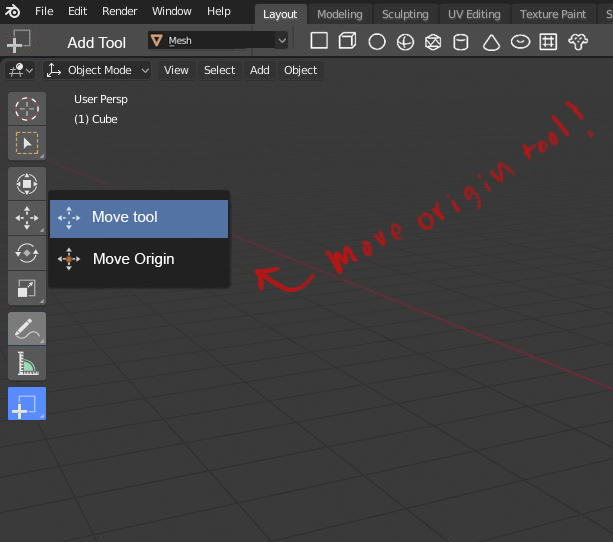
I think it is not fully done yet. It works now not as tweaking of move tool, which simply works everywhere you chose it, but only in object mode. You have to switch to object mode, move origin and switch back.

13 Comments
Yes !
Or even a submode of the move tool, togglable via shortcut. Like <kbd>Inser</kbd> in other 3D softwares.
@loic.dautry: I hope it gets attention
man i have been asking for this on every forum/stream and also easy snapping for it like in maya which it has a whole features for pivot point and you don't have to enter edit mode..they keep telling me it's not planned.
This is such a necessary feature. It's frustrating that it takes so much work to place the origin when in other software it's a simple as moving a vertex. Even more frustrating is that this request has been ignored for so long.
you cant leave basic stuff like this for the care of th addons. Using and learning blender is such a disjointed experience.
Solved!
not exactly what you asked but better : youtu.be/fCxnrwbsdlw?t=200
I've also made a proposal with origin switch/toggle in transform tool: blender.community/c/rightclickselect/hFbbbc/
I also agree and voter an intuitive way to move the origin.
in 2.8 you can drag 3d cursor and snapping to vertex then set origin to 3d cursor if you want, but this proposal also quite handy :)
yeah.. this would be great, it is always a hack to change the pivot, but would be even awesomer if we could move/rotate/scale it, because moving it is the easier part yet.
I think it is not fully done yet. It works now not as tweaking of move tool, which simply works everywhere you chose it, but only in object mode. You have to switch to object mode, move origin and switch back.
blender.community/c/rightclickselect/Ldbbbc/
------------------------------------------------------ github.com/JoseConseco/PivotPro
same for 3d cursor