
List of inconveniences while using a grease pencil
- Unless I'm in object mode, I cannot move to another grease pencil object. I hope it can be switched even if it is not in object mode.
2.Having to turn on the grease pencil, dope sheet, and action windows one by one. It is difficult to draw because the dope sheet, timeline, and video sequence take up too much of the drawing area. It is difficult to create and delete a window
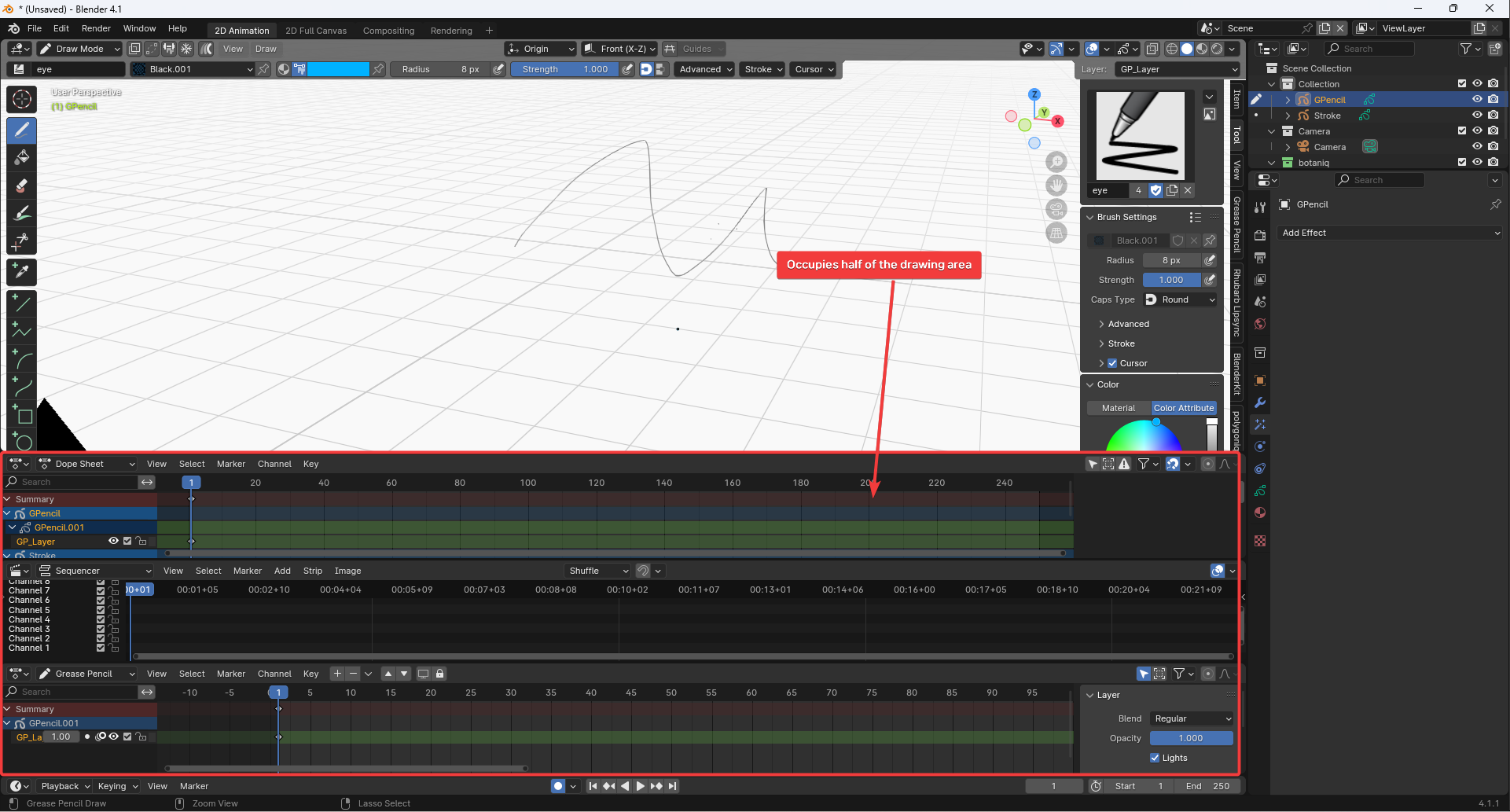 I wish I could reduce the window to the maximum and put it all in one window.
If this doesn't work, I would like it to change to a window set by the individual, such as a dope sheet grease pencil video sequence, every time the tab is pressed.

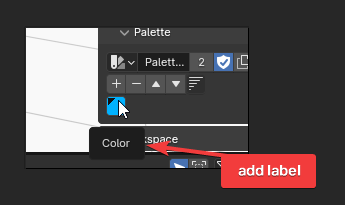
- Palettes are not saved as integrations. I used to use materials, but adding materials was too inconvenient, so I use a palette. When I create a new file, I have to load a new palette, which is inconvenient. Anyway, I have to keep using the main character, but it's difficult to load a new one every time, and it's also difficult to set up a startup file. Additionally, it would be nice to be able to annotate palette colors.
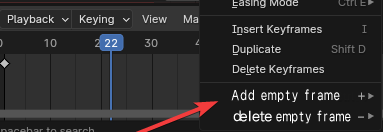
- The timeline is also very inconvenient. I wish I could operate it with just the keyboard instead of using a mouse. There are times when I copy and paste the previous frame. It's inconvenient to press shift + d every time. And when I need more empty space between keyframes, it is inconvenient to select and then move all subsequent frames. I wish I could just press a button and add an empty frame.
If the above things are changed, work efficiency will likely increase.
2 Comments
We always tell people to make one proposal per post. Because otherwise it makes the votes completely useless, and discussions about proposals become unnecessarily tedious.
Also, calling something "inconvenient" or "difficult" doesn't really help if you don't explain why, and if you don't propose a solution that explicitly solves this and also visibly fits in Blender.
1. Switch grease pencil object without switching to Object Mode
You can use the outliner:
2. Opening windows
You don't show multiple windows in your screenshots, but areas with different editors in them. It's preferable to use the correct terminology to avoid confusions:
Areas - Blender 4.1 Manual
I'm not sure why you open two different dopesheets and the video sequencer in the first place (if you open the vse to display an audio waveform, I recommend considering buying this 1$ addon: Sound Waveform Display - Blender Market ).
I am also not sure what these mean:
If you need a specific workspace frequently, you can create it once and save it as a new custom workspace. You can even save it in your startup file so that you have it in any new project, or you can append it from another file.
See Workspaces - Blender 4.1 Manual .
Also, have you tried Blender's 2D animation workspaces, and also the template you can get when creating a new file?
See Grease Pencil - Introduction - 2D Animation Template - Blender 4.1 Manual
Again, why do you open all these editors in the first place? And why spread them so large on the screen? You make your own bed.
Also, do you know you can maximize or even fullscreen any area at any time using the view > area menu or using the shortcuts ⎈ Ctrl Space and ⎈ Ctrl ⎇ Alt Space respectively?
3. Palettes
What does this mean?
If you need the same palette every time you create a new file, then save it in your startup file.
It's as simple as opening the default file, appending your palette, and using File > Save as startup file.
See Configuring Blender - Defaults - Saving Defaults - Blender 4.1 Manual
Can you elaborate?
True, that's the first thing that could make a nice feature proposal that's both relatable and simple here. But it's been proposed already:
Feature Suggestion : Names for colors in palette — Right-Click Select
4. Timeline
If the only inconveniences are the ones you mention, that's not a very inconvenient timeline. But a very gratuitous poke. 🙃
You can! What are you missing precisely?
The tooltips of any button/menu shows the corresponding keyboard shortcut, if there's one.
Anything that doesn't have a shortcut already, you can right-click > add to quick favorites menu or assign your own shortcut.
You can also see Timeline - Blender 4.1 Manual
Use ⎈ Ctrl C - ⎈ Ctrl V to copy-paste. The shortcut ⇧ Shift D only duplicates things, it's a different tool.
How is this inconvenient? What do you propose instead?
How is it inconvenient? It's pretty fast to do, especially if you know your shortcuts. Drag the playhead where you want more frames, ⎈ Ctrl Click to select all keyframes before/after the playhead, click and drag keyframes:
Besides, unlike some traditional 2D animation softwares where frames only exist when the user makes one, here we are in a kind of software where you don't create nor delete frames. The timeline is constant, frames exist in the timeline independently of anything else, and you decide to populate them or not with a keyframe. So semantically, this isn't "adding an empty frame", but effectively "moving/offsetting all following keyframes by one frame".
Technically there could be a function that does exactly that, just move all following keyframes by one frame forward. But:
Hence the usual workflow for this is simply to require a selection first, which also happens to be Blender's common way of functioning: select first, then operate on the selection.
So a more appropriate tool could be an offset, some other software have such thing, sometimes as a triple-input widget: forward and backward direction of offset, and the amount of frames to offset by.
Good to mention that there are already some proposals that have some creative ideas of ways to offset keyframes (though more specifically to stagger / follow-through):
I'm sorry. Next time, I'll follow the guidelines and upload them. Your response was helpful, thank you.