
Make Collections Transformable like Objects (Transform, Rot, Scale, Origin, Align, Mirror!)
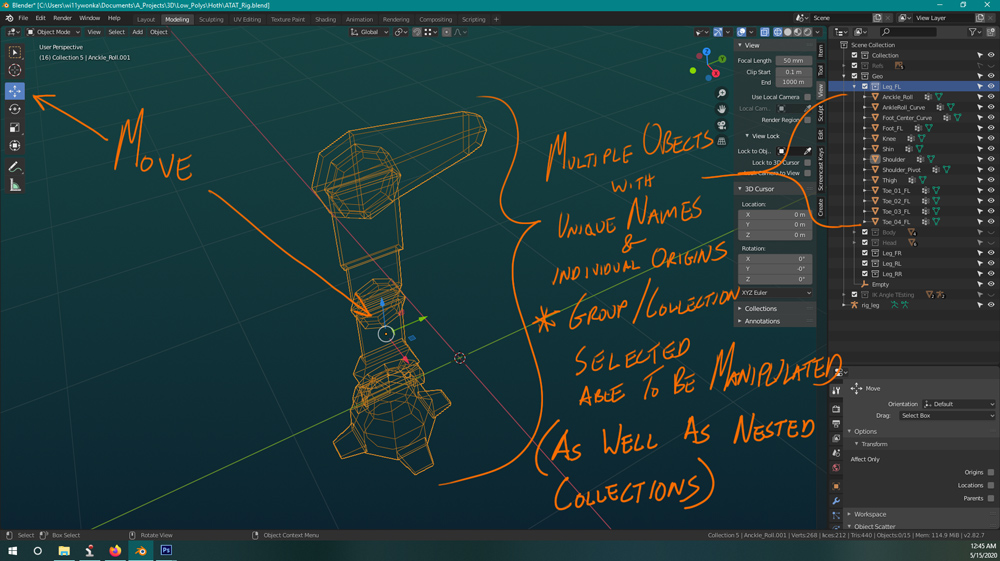
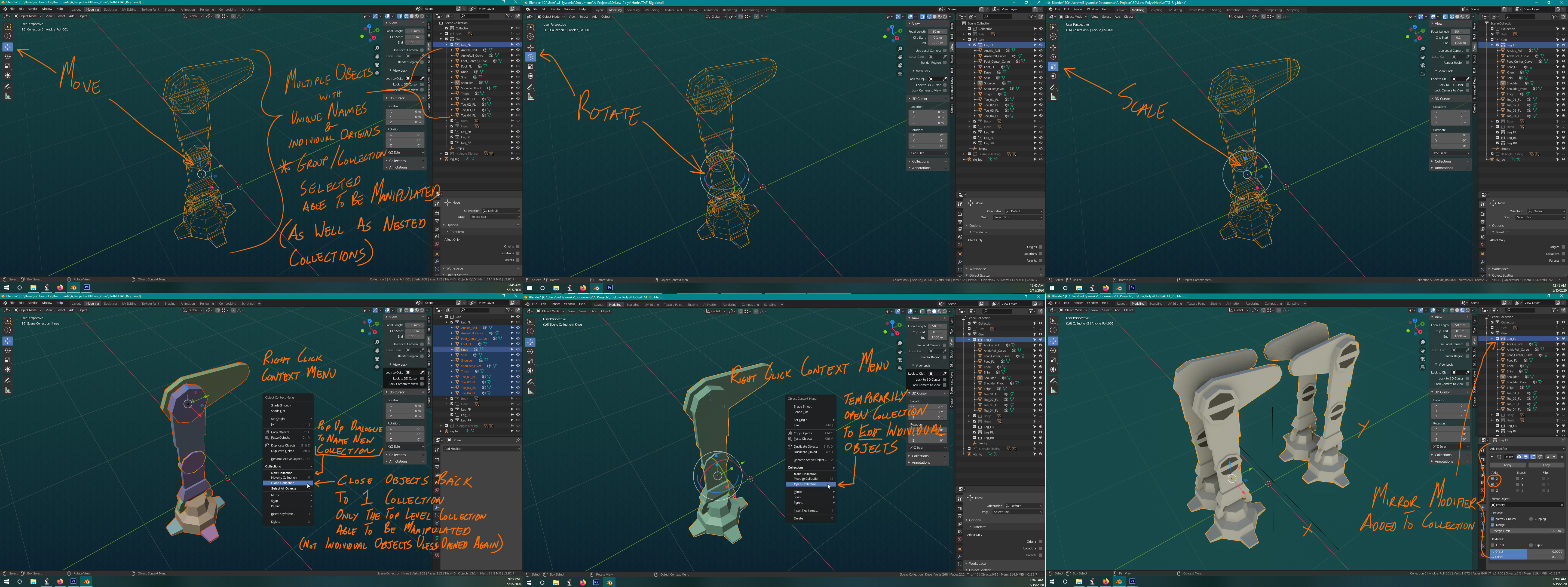
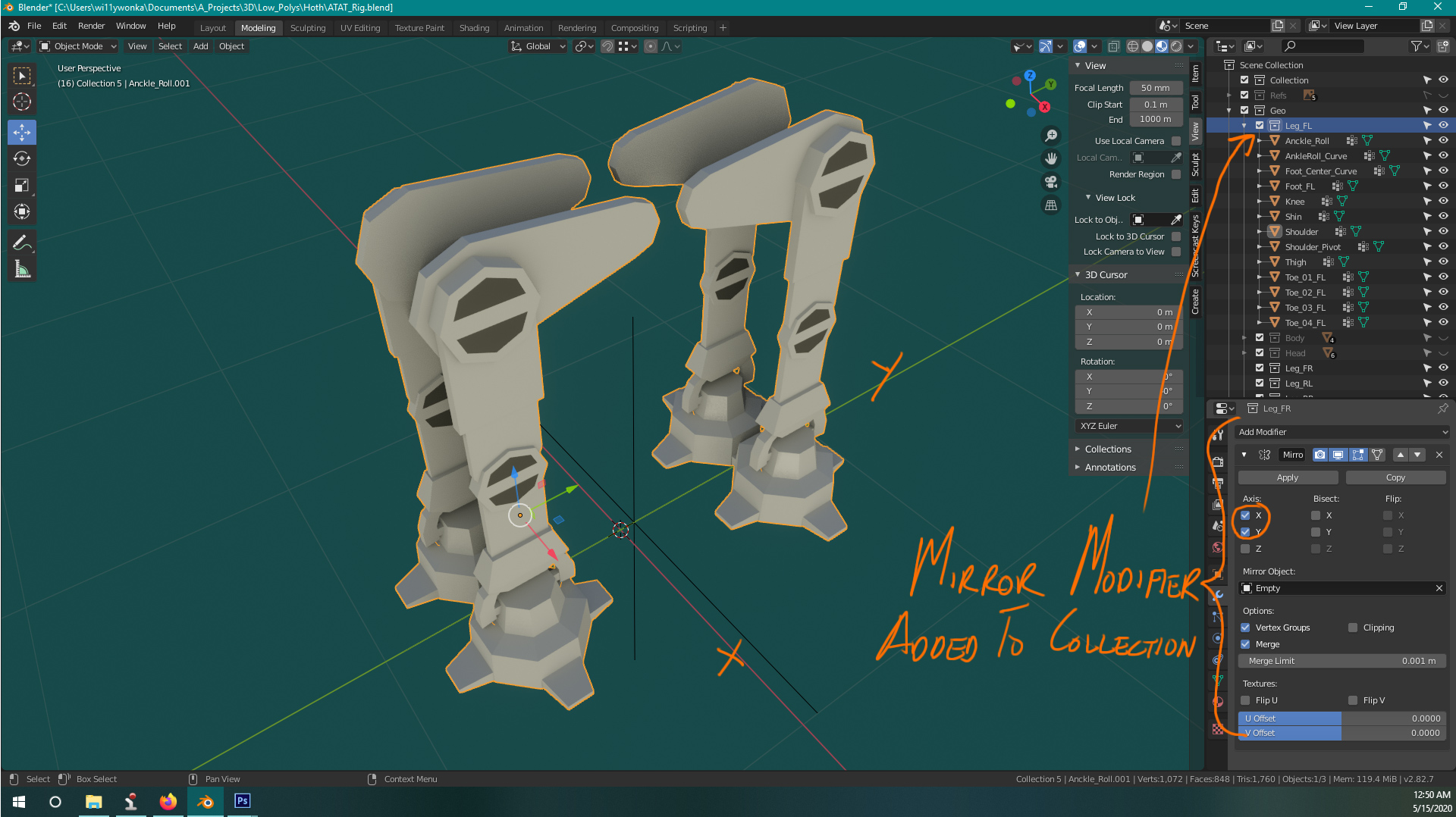
Since it doesn't seem like group exists anymore and collections has taken over, why can't we do anything with it? We should have the option to instance or what I want to make copy . I want to group a mechanical leg with many pieces, all named and have there own origins. I then wish to be able to move that group around as if it were it's own object with all the properties and abilities there of, such as transform, rotate, scale, move origins, align, add modifiers(mirror) to them while keeping everything tidy inside. while we're at it maybe batch rename too but I can open another thread for that. Also having to CTRL-J all the objects destroys there names and origins. I wish to their integrity if I want to UNgroup later. A COLLECTION should be an object all its own!
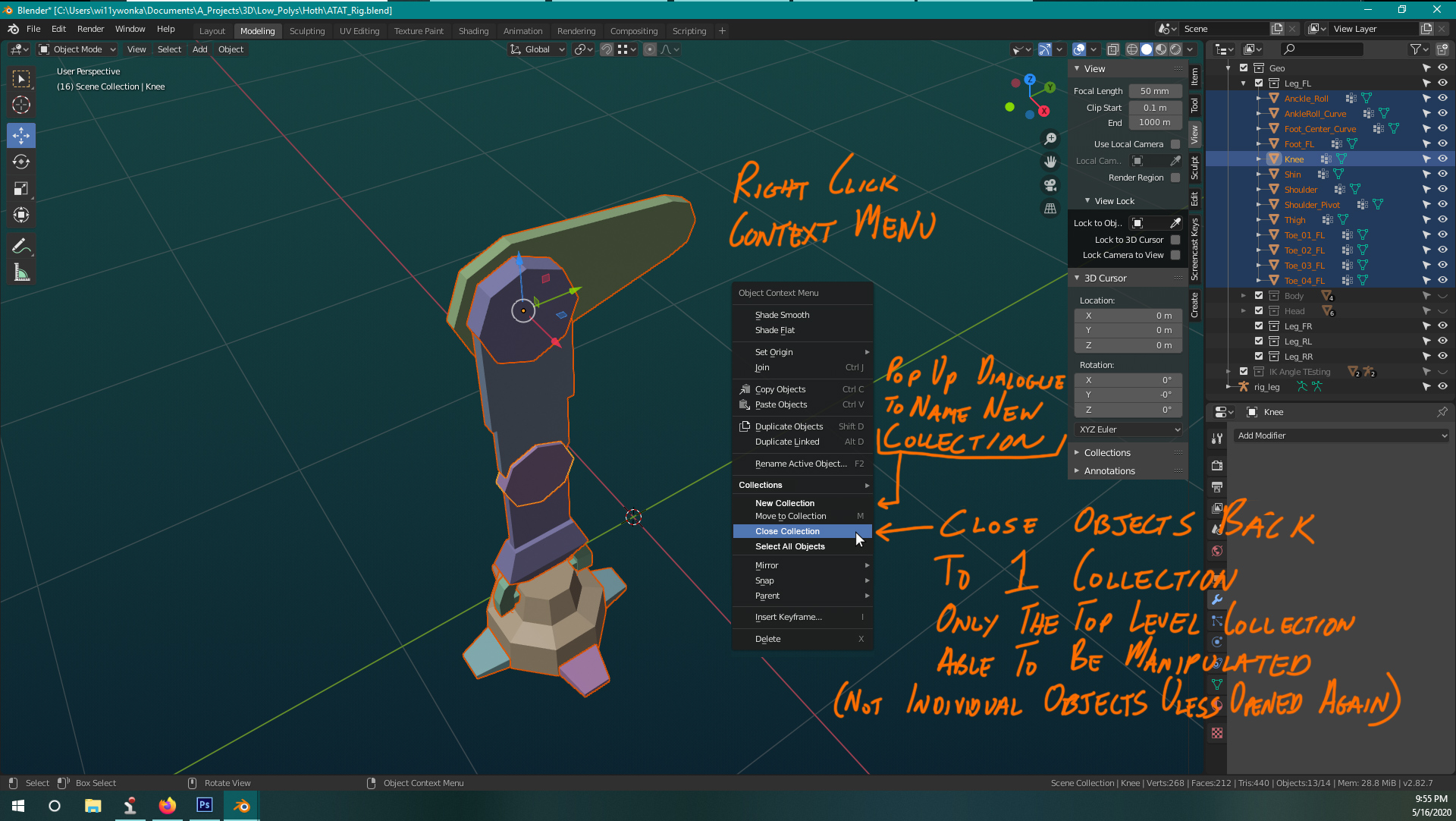
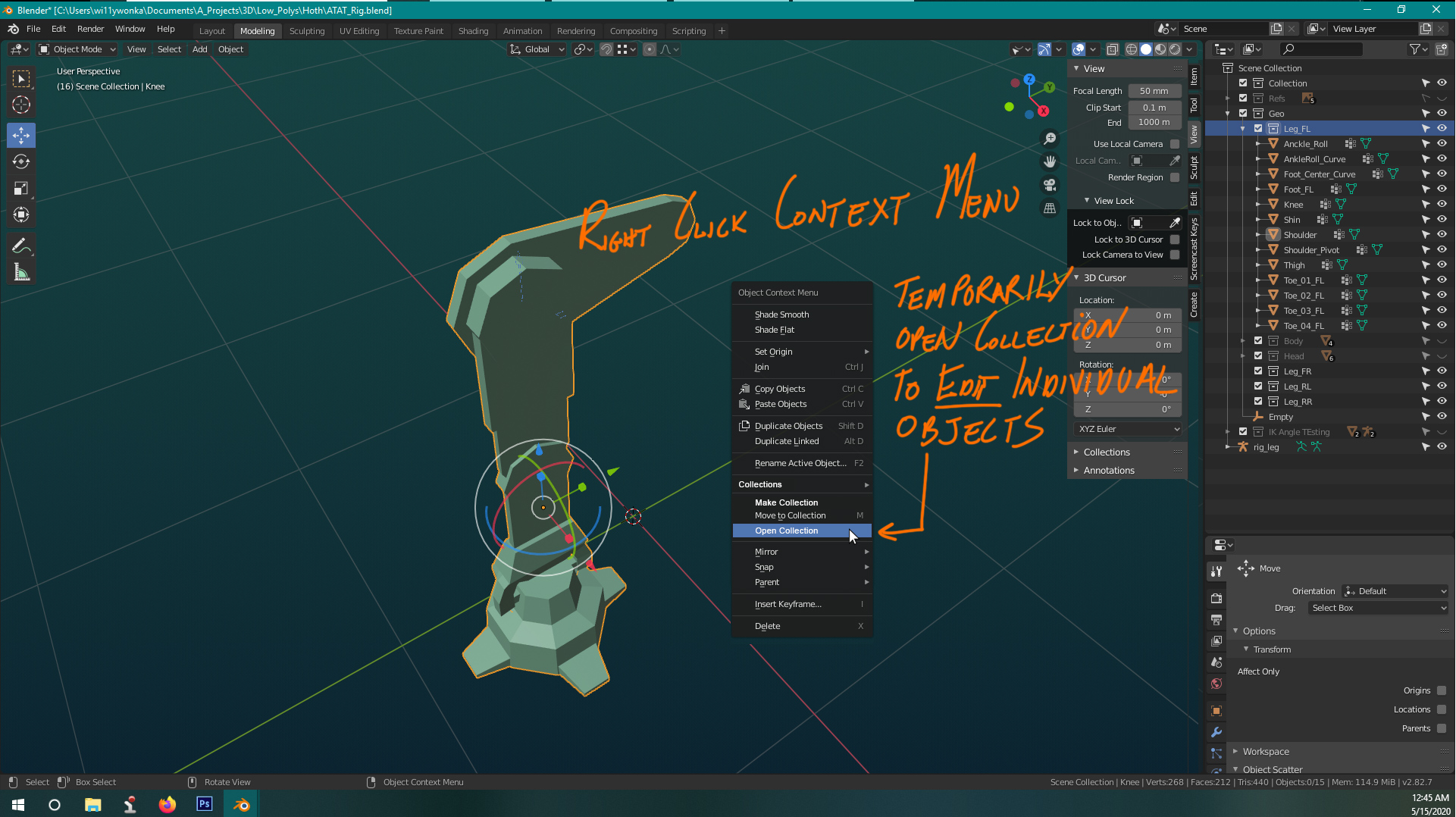
To reiterate when I click on the collection name in the Outliner I want to be able to manipulate it in the 3D viewport. If I select any object in that collection it will select the collection. I think MAYA has the ability to OPEN the group(collection) so you can temporarily manipulate each object then CLOSE it again without destroying the collection. Just like a manila folder holds all the papers, you can move the folder around, then you can open it and reorganize the papers then close it again.
Here is an image I mocked up in PhotoShop see the other images in the comments of what I mean.
20 Comments
Agree, this is much needed! Other 3D programs work this way. In C4D I can group objects, add modifiers to the whole group while keeping the objects separated. I can then move the objects in and out of the group, add other objects, add modifiers to individual objects, create sub-groups, and add modifiers to them... It gives the user a lot of freedom in terms of how to manipulate the geometry in the scene. I wish Blender had something similar. The Collection Instance it's very, very limited in comparison.
* @verysame * YEES! I love all that nesting, moving in and out of the group! adding modifiers not only to the main group but subgroups!!! Wow thats all amazing Ill try to make a visual mock up today with all these suggestions thank you all!!!
I have seen this come up a few times and get shot down. Which is absolutely disheartening, because Blender really does need a proper grouping system. The way I always explain it is that it is built into how we think. When we see a bicycle we see it as a singular object, when in reality it is an assembly. A group or collection of objects that create a new singular object. Collections represent this in a few ways, however, the problem is that an object can exist in multiple collections at the same time. They are not intended to be a visual representation of an object hierarchy. Which I understand, and fully accept.
However, it doesn't change the fact that Blender needs a proper grouping system.
I hope this gets some traction this time, but I am not holding my breath as the typical response has always been positive by the users and negative by the developers. Here are few other times this has been brought up on Right-Click Select. The first one being 5 years old.
blender.community/c/rightclickselect/Rcbbbc/ blender.community/c/rightclickselect/Fzbbbc/ blender.community/c/rightclickselect/nSfbbc/
New User to Blender (but I'm old, so...), I find this function to be indispensable. I really don't know how to do simple things such as align a row of seats in a wagon without using Groups. Call 'em Collections if you will, but have 'em usable as Objects, please. (Pretty please..? Thanks in advance...)
I guess one can select the objects in the collection by right clicking and selecting "select hierarchy". Then the transform operations can be performed. The downside is that it doesn't behave like a group (single object). So modifiers to the collections can't be done. So I agree, this is a very much needed feature.
I agree. My wish / idea would be: A "special" click (maybe with ALT) onto a collection within the Outliner could select all objects of this collection. Now you could then manipulate them at once. Maybe this is an other feature request, but my thougths on your approach seem to be right placed here.
* @Eno Kahl * I mean why NOT have that as an option as well the key here is not to be pigeon holed. We need options. but yeah have that as a right click menu would be great as well!
* @Eno Kahl * you can do that easily by adding a shortcut to select hierarchy
This would be beautiful. An easy way to know when this would work would be changing the outline color to indicate it's a collection selection.
* @GabrielMoro * OOO that is a GREAT IDEA!!! Yes This Like a bright BLUE!!!
I assume you are referring to instanced collections. The current way this is implemented I'm not an expert on myself, but basically provides a massive speed increase in duplicating objects by sort of "referencing," the original object, instead of duplicating. This has the downside of requiring the duplicate to be identical to the original.
I agree though, it would be nice to have different types of collection instancing sort of like what we have with normal objects, where we can either duplicate or have a linked duplicate. With collections it would probably be better to have "instanced," or "linked," where instanced is the current implementation, and linked is one where changes to the original still update the copy, supports things like modifiers, but is slower.
* @Zach Hixson * Yes Zach. I wish for options. Instancing is great but even then we have no control over the collection it is JUST a folder when since it did away with groups it should be able to be manipulated; transform, rot, scale, move pivot, align, edit I guess as one object. We have NO way of manipulating a group just a bunch of many objects THAT does not save time at all! and as far as performance time. I'm not doing major group copying with many multiples to slow things down. This is a quadruped robot. Had all the legs, needed to change so I had tore copy everything and the only way to do it quick is to join them use mirror then unjoin. Then they have there names and origins all messed up and I have to go through and rename every single piece X4. I should be able to name all the pieces of one leg, group them preserving all their individual names. Mirror the group like any object. Be cable just to batch change the suffixes of the names and boom 4 separate groups with many parts and their suffix names changed; like leg_ankle_joint_rt to leg_ankle_joint_lt. Sorry for long responce
Forgot about this. Just wish someone at Blender would see. Just posted my menu mock up samples. Couldn't before.
I find it really strange that you can't transform collections. It seems you can do 'Instance to Scene' and then transform that.
{attachment Add_Modifier_Collectionjpg}
{attachment Close_Collectionjpg}{attachment Open_Collectionjpg}
{attachment Scale_Collectionjpg}
{attachment Rotate_Collectionjpg}
Does anyone know how to upload multiple images? I did all that work in Photoshop to mock up simple menus but it seems like I can only upload 1 image. Its just that you can't the details here.
* @theartoframos * I think you can just drag and drop them into the text box. If that doesn't work, you can always add them in separate comments in a comment thread down here