
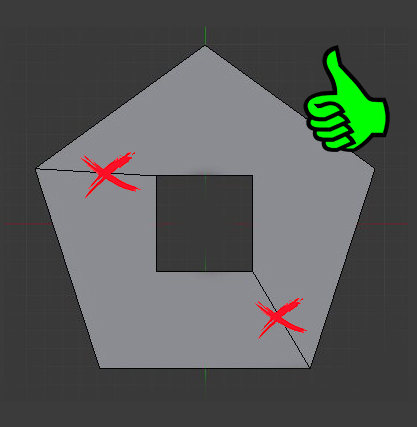
its impossible to create a hole on a face !
hello
its impossible for blender to generate a face with a hole in it ! IMPOSSIBLE ! try ahead !
Modelers face this constantly and this pose a lot of problems in a lot of situations ! its really annoying for users that relate on precision like architects and engineers
please give us an option to make thoses edges invisible and impossible to interact with and consider them part of the triangularisation that the computer will calculate
if it could be done (and it can be done , look at cad software like sketchup) this will be a great weight lifted for a lot of artists and precise users ! let us have an option to hide them
thanks
36 Comments
I just thought of it... In Blender 2.8, workspaces are supposed to be able to each have their own settings, user prefs, addons, etc... So I guess a CAD workspace would make sense?
It will surely reduce the confusion of settings like hiding geometry which in other usual use are contradictory to the core needs.
Really guys, i am well aware of artist user dominance in the user base, but this CAD-fobia on Blender's user side is so discouraging. You should be aware of the fact that there are some of us here coming from CAD world trying to use Blender against all odds. We could just spring off and use much more CAD friendly software just like anybody else, but we are here because we believe in it. And you could use our experience from other, mainly CAD software which i see not many people using Blender ever venture in seriously, there are many easily solvable quirks Blender could get rid of if it was open to precision world.
You think Blender is fast and user friendly? Maybe compared to max or other mastodons. There are some apps you will rarely hear about because their users are not on Blender's forums.
I think requests should be argumented, from "why" to "how".
Because there are thousands of others interesting things on the line, each might deserve some dev time, so each have to prove their point to make it through.
@loic.dautry: Well, if we are being specific about this feature, there might be some experience issue. There is a certain ease-of-workflof this ability enables when working in SketchUp. I am not sure how it manages to do it, but for example, you could move such a hole (eg a window) through a whole complex planar surface without ever seeing a triangle face overlapping your hole. As if it was an active boolean constantly recalculating itself. Somehow it makes the extrusion and pertrusion based workflow a breeze. Those edges get in the way of it, as well as latter smoothing and real boolean operations.
In my view, there is rarely a need for a divisional edge in a planar face, unless the user is about to fold it and specifically creates a cut somewhere.
In my memories, sketchup doesn't display mesh in the first place (not even sure it works with a mesh, maybe it's full parametric, surfacic or whateverelse). It only displays what you specificly drew, nothing else.
About moving a windows arround : boolean modifier in Blender. Surface-like booleans (no mesh involved) in cad softwares.
@Okavango: I wasn't aware that blender user based are so cad-phobic... I think precision and blender could coexist in the same space easily
I think it's the way he asked, personally I would love to not have those lines and have more CAD tools. I use fusion 360 and it changed my workflow on blender for the best. Check at my youtube channel to see ;)
This is essential
please can someone tell me why we need thoses extra edges when creating holes ?
For them to actually exist ? this is how polygonal geometry works... You know, maths, ....
@loic.dautry: dont you want blender fit to cad users too ? all im asking is a checkbox to hide thoses kind of useless edges because it can totally help people who like to do precise work ...
if your argument is "thats not how math work, consider the fact that quads and ngon also dont exist in the computer world but blender stills hide them ,why ? for modeling facilities !!! and this is also the exact reason why i want an option to hide thoses useless edges ..
@dodododorian: and the demand is high too , thoses topic are in the first two pages of right click select , all demanding more cad friendly option ...
blender.community/c/rightclickselect/3Dbbbc/
blender.community/c/rightclickselect/vMbbbc/
blender.community/c/rightclickselect/HTbbbc/
blender.community/c/rightclickselect/QTbbbc/
blender.community/c/rightclickselect/TSbbbc/
Right now, Blender cannot hide or not add those lines, the boolean tool makes the face because it's needed. I know that one dev talked about the possibility to not add them and it would be really nice.
So, for now, no need to cry and complain, be patient and deal with it. It's not a big deal to have them.
And you're not on sketchup, if you want the same result, use sketchup ;)
@Cédric Lepiller: no its more of a general demand for blender to have more cad friendly options , theres a lot of demand like this in this forum
-- Edited due to misunderstanding --
Not at the expanse of other users. CAD programs don't use the same methods for modeling, most of them don't even use polygonal technologies under the hood, they use things like surfaces, fully mathematical curves & boolean operations drawn on pixel basis , ... Blender is on a complete different world, made of vertices, edges and triangles .
It's not made for CAD. Of course you can use it for that matter, but you still have to do CAD within polygonal modeling paradigm, with polygonal tools and thoughts.
If you're that bothered by an edge when youre editing a mesh, then either get over it, otherwise maybe reconsider your software choice.
I don't understand why Blender should mimic behaviors from other softwares that are in contradiction with it's own functions. Like hiding important geometry data when editing said geometry. And it's not even something you "need", it's just that you don't like to see it. While for other users, it's vital to see it and being able to use it.
There are plenty other things that Blender is already meant to do and need way more dev work.
Yet, you're crying for some edges you want to hide because you are using Blender for something that he isn't meant to do in the first place.
So yes, some might not follow you on that one, while you might have demand for other things like better snaping tools & unit systems (not in the goal of more cao friendlyness, but because we all need those anyway).
@loic.dautry: im not talking about reworking the entire edit mode to do a cad software , im talking about few options and tools to ehance precision ,and im not the one crying right now , calm down, dont be so trigger for some demand that will not change anyone workflow at all ...
if you are spiting on users that use blender for precision modeling that's your problem , but dont mlake your point of view representative of the entire blender community because its simply not the cases , blender is volatile and is the swiss-knife of the 3D industry , dont be so close minded when im just asking to make one of thoses tools more sharp ...
@dodododorian:
In fairness, hiding these edges actually reduces precision as well as accuracy because it hides geometry that is there and is essential... and when folks get around to setting materials and textures (which is one of the many uses CAD people look to Blender), missing those edges makes it very difficult to troubleshoot things (e.g. slightly non-coplanar faces, flipped normals, unexpected bevel behavior, and so on).
Maybe I wasn't clear.
What I'm concerned about is making changes that goes against core principles of Blender/polygonal paradigms only for the sake of fitting other paradigms.
I think that if other paradigms could be fitted, this should be done within the paradigm already in place without conflict and should not denaturate it.
Now, an option for hiding edges being the case here.
I'm opposed to that because to me, it's in conflict with how polygonal modeling works and how people work in Blender. And I bet it will also bring confusion, because not seing something that's technically there doesn't seem quite logical to me.
So either there is a way arround, either I stay on that statement. And for now, the only replies I've seen are "why do you need an edge" (duh) and "<cao software> does it nicely".
If there was no edge at all in the editable mesh (the same way quads are quads until we triangulate them), that would be totally different from an option to hide some existing mesh.
@Jason van Gumster: in a computing point of view I can understand , but for an engineer or an architects thoses lines are just a pain
Upvoted.
SketchUp is not a CAD software, it is just brilliantly designed for lightning fast precision modelling, which is missing in Blender.
It's brillantly designed to hide away any technical aspect to the user because the only focus of Skethup is the shape and only the shape.
Which is the opposite goal of Blender, where the focus is to give pretty mutch anything the user could ever need, including topology, polycount, shading, normals, correct work with modifiers, ... Things that Sketchup don't give a damn and sketchup users mainly never heard of or don't want to bother (hence the software choice).
And yes, Sketchup is a CAD software .
@Okavango: Most of Sketchup scenes which I have expirience to hold in hands ( as a reference for work on Unreal Engine scenes ) is a god damn crap with some shit like bicycle stand from one curved tube about 1kk of triangles and etc. . I have no idea how Sketcup handle such tons of mesh but what I understand that those architectors who work on Skenchup mostly don't think about polycount at all...
@forestgumpovu4: when youre exporting wrong it triangulate eveything and you dont want that , you need to keep the ngon avaible to work with in blender too , sketchup is an ngon creation program , and it make architects life easier that way
What a problem to make a hole ? ...


@forestgumpovu4: it create extra edges that can make your life difficult when modeling
It doesn't create "extra" edges, they are vital : a ndgon can't define a concave surface, you need some edges.
@dorianborremans: What you see it is not " it create extra edge ". Polygonal 3D ( not CAD ) work this way - there are vertices, each 3 vertices = triangle plane. The fact that viewport don't show edges of this triangles as " edges " not mean that there is no edges technicaly. What you see in GIFs - I just meke this edges visible as fixed subelements " edges " which you can connect if you need this in correcnt for current current model case way... There is no " polydons " or " ngons " in such 3D graphic. If you look at 3D - you have to understand that you see vertices with coordinates & normals and eact three of them is triangle. If you count mesh complexity - count vertices and triangles not some spherical ngon polygons in spherical vacuum ...
@forestgumpovu4: hi there, what script's are you using for this function ?
@remosande: What function? In GIFs only blender own functionlity + PIE Menu Editor - Ctrl + F > Intersect Knife, Intersect Boolean, Triangulate Faces, Tris to Quads: Knife Tool: Mesh > Clean up > Split Concave Faces.
I use shortcuts but I don't remember which is still default and which I remap...
@forestgumpovu4: "Split Concave Faces" that was the one :) thanks Forest.
Skechup just hide the edges, because it is a CAD software, and Blender is not for CAD.
@Luis Ig. Garcia: why not just having the option to hide it ?
Because the edit mode is supposed to show it so you can edit it. Because this is what a polygonal modeling software like blender is meant to be. And this is what a CAD software like sketchub meant to not be.
Blender isn't a CAD software, not meant to become one, that's it.
@loic.dautry: dont be so close-minded , blender having more cad friendly options is a field opener for a whole new 3d industry .. designers , engineers , architects ...
If you make your shape in paths rather than a mesh you can make a hole like this.