
Blur Node
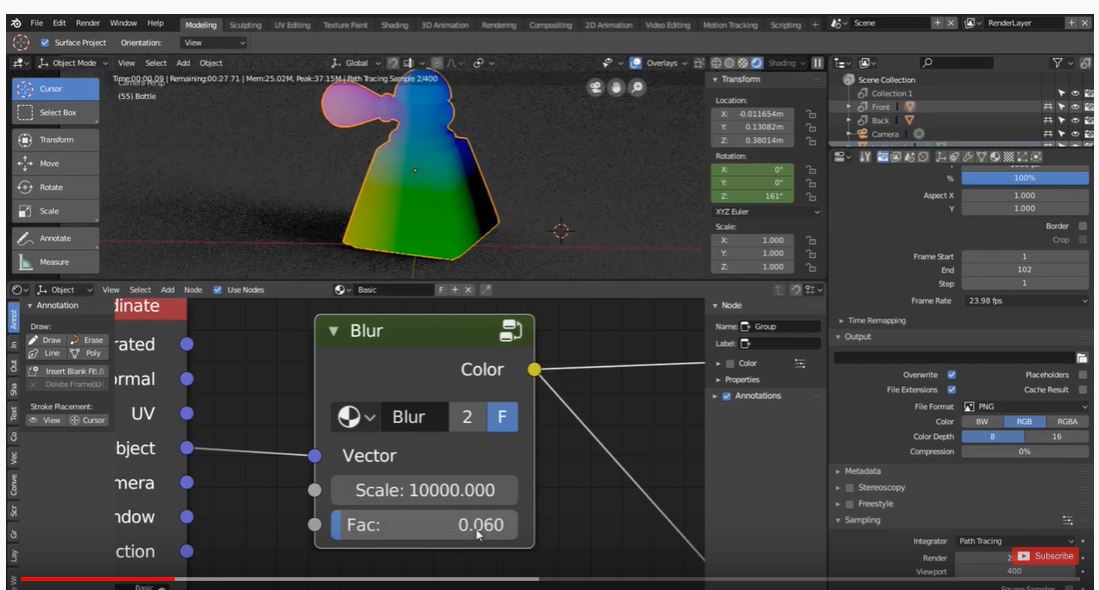
I'm a beginner with Blelnder and I have an issue in finding the Blur Node in the Shader Editor. In the image attached of a Youtube tutorial the Blur Node was simply added with Shift+A in the Shader Editor, but I can find the Blur Node only in the Compositor. How can I use the Blur in the Shader Editor?
7 Comments
There is no built in blur node. What you see here is a custom node group that the user made.
Blurring a shader doesn't work like how you think, and based on this I assume they are using a "ripple based," blur, where they basically just add billions of tiny ripples to the texture. I have given an example in the attached image:{attachment blur_expng}
If you are using UV coordinates, then plug in the "UV," socket, instead of "Generated."
Also, just a heads up, RCS isn't a forum for questions, it's for making detailed proposals of new Blender features. Very few people will help you here (with some exceptions like me), and there are quite a few people who will actually get angry. BlenderArtists.org is a much better place for asking support questions.
As Zach said, there is no blur node. When you see this icon on the top right of a node, it indicates it's a Node Group (a bit like a collection but for node). As he also stated, RCS is for feature proposal ;) This is not to be mean, but posting questions here will make you loose reputation (the number in parenthesis after your nickname) and will also just hide true proposals in questions if everybody does the same.
You can also take a look on BlendSwap to download materials and see how they are made. Good luck ;)
Can we have one in Geometry nodes too. There is texture there too.
I have an idea for a different approach: having a node for blurring any input would be ideal but unachievable due to the nature of pathtracing, but we could at least have a blur feature for image textures as a slider in the node. The images in shader get loaded into memory, so they could be blurred on the fly and loaded into memory as usual. This could take a short and reasonable amount of preprocessing time. Maybe this could be food for another (almost duplicate) proposal on this site.
* @ Lsscpp * This would be a job for texture nodes. I don't know of anybody who actually uses the texture nodes feature. We need better integration between texture/shader nodes, or perhaps merge them into one.
Would be nice if there was a blur node
* @peter.boos * I think this would certainly be possible. One method to calculate it would be simply adding a random value to the UV coordinate that a sampled ray hits.
EX: rayUV += randomNumPerRay * blurAmt
This should work, but I don't know cycles internals, so it might be a little more difficult