
Lock Camera to View Icon
Note: This has been suggested before here and indirectly here , but AFAIK it hasn't gotten its own dedicated post yet. I think it's important enough to warrant its own post.
Currently the way you enable Lock Camera to View has a few flaws:
-
Most importantly, lack of discoverability for new users ! Since the camera doesn't move by default, new users will click on the camera icon and then not know how to move it. This is not good ! It will give newbies the impression that Blender is harder to use than it is.
-
Requires 3 or 4 clicks (hit N to open the side panel, click to select "View", click the "Lock Camera to View", hit N again to close it) instead of 1.
-
The N panel takes up a lot of space, so it's annoying to have to keep opening it.
-
Easy to forget you've enabled it. Every time I use Blender I find myself making unwanted camera movements and having to undo them!
-
It's a little bit poorly named, because it does move when it's locked and it doesn't move when it's not locked! For me, this leads to a lot of accidentally checking the box when I want it to be unchecked, or vice versa.
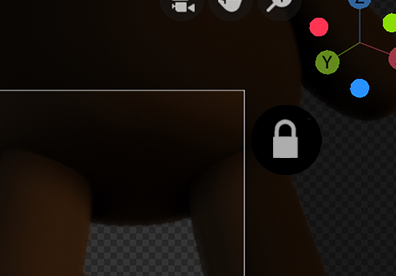
The obvious solution is to get rid of the Lock Camera to View checkbox and replace it with a little padlock icon somewhere outside of the camera frame in Camera View, which prevents the camera from moving.
This would be more intuitive, less clicky, and easier to see at a glance whether or not you've left it on.
6 Comments
Done! projects.blender.org/blender/blender/pulls/111076
It will be part of Blender 4.1
i think this is the perfect place for it, instead of just sitting randomly on the side of the view because we can do 2d Pan/zoom..etc and not get it lost with it.
I think it's the intention of the new widget system to integrate this type of options into the 3D view.
Personally I would like this option from the camera view, outside the edge of the camera (I'm not sure if you're suggesting that, the image is confusing to me). I wouldn't put anything in Navigate Gizmo (this can be hidden and we would lose this option).
And what do you think about the Lock Camera to View being per camera and not globlal? Sometimes I want a static camera (for example to project images) and I have to be careful with this option.
* @Luis Perez * That's what I meant, yeah. This wouldn’t be attached to the navigation gizmo, but instead outside the border of the camera in camera view.
I've updated the post to try and clarify.
I haven't thought about that much, but probably having per camera lock settings makes more sense than having it be global. I can also see why you would want cameras to be locked by default, because sometimes you want to place a camera very precisely on, say, the x axis and facing forward.
* @richardhnoble * Perfect! You have my vote. :)
This could be combined with this proposal to let users lock the view , or it could just work on the camera. Personally, I think it would be great to be able to lock the scene view as well as the camera view, but I can see how adding another icon to the viewport might become annoying, especially to new users who might click it accidentally.
My personal preference is this:
The lock functionality should be available all views, but by default it should only be visible in the camera view. That way, power users can enable it when they become more proficient with Blender, but it won't confuse new users.
The other question is whether or not the camera should be locked by default. I've suggested before (in an unpopular post) that new users will want to move the camera around, but I think as long as there's a clearly visible icon that shows the lock/unlock state of the camera, it doesn't really matter.