
Ability for users to set Default Values throughout UI via right-click menu
Many, many RightClickSelect proposals are disagreements about default values .
Here are some examples:
- Line art "Usage" Collection should be "Exclude" by default!
- Auto iteration count off by default
- Passepartout default to 1.0
- Need to be able to set user-defined "Units" default
- Provide a way to set the interpolation default for all new textures.
- Multiply nodes should be set to 1 by default
- Set default target and owner space for constraints in preferences
- 5.0 Suggest restoring the bump node to the original default settings parameters in 4.2
- Set playback sync to "frame-dropping" by default instead of "play every frame"
- Matroska shouldn't be the the default video container, MPEG4 should be
- Reduce default number of Cycles samples from 4096 to something more reasonable
- and many, many, many more
I'm sure you have examples of your own - I certainly do 🙃 And that's fair enough: many people use Blender for completely different tasks, and what works for one person may not work for everyone.
My suggestion is a new option in the context menu you get when right-clicking on the property, below
Reset to Default Value
(which already exists), a new command
Store as Default Value
(or similar).
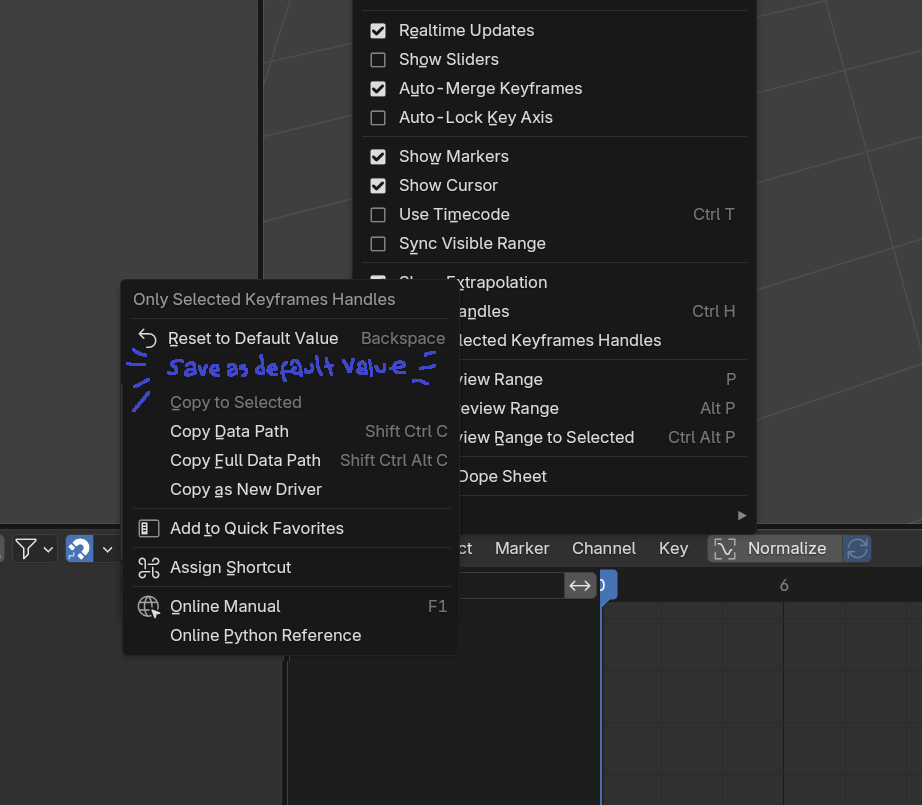
When a User Default Value has been set, there should probably be a
Clear User Default Value
or similar to "restore the default default".
That's it. Suddenly everyone is just a little bit happier every day 😁
What do you think?
7 Comments
Funny thing is, at first i thought this is how the "save as startup file" worked. But it doesn't lol. Every time i open a project i have to reset all the defaults for tools and operators with greasepencil because i prefer them set a certain way and i NEVER use them on there other settings. But i can't change them. i know this is possible through python to make a outside json file you would use to have the settings but i wish it was just a built in function.
change the values to what you want, then save the file as the startup file. This is exactly what you want to do :)
Good idea, but it doesn't actually solve this in many cases, especially if you ever rearrange the Blender UI. I can do what I want in the startup file, but every time I make a new Graph Editor panel it defaults to
Only View Selectedbeing turned off, every time I make a new Grease Pencil Layer (and I make a lot of those!) I have to turn offUse Lights, every time I make a Dope Sheet I have to turn onView Slidersetc.have edited the proposal with some additional ideas, see what you think
Riight!? i always have to set the pinch tool to inflate, set the Smooth operator to "keep shape" ( why would you want to smooth and not keep the shape in most cases? ) , and i always have to uncheck "use selection" in the grease pencil interpolate sequence every time i use it, because it fails 90% of the time if you don't. As for "Use lights" One thing i've found is that it doesn't matter if you set the Color management in the Render properties to View: Standard , and Look: Medium High Contrast. it makes the colors look right again. So then if you want you can use lighting and also spots of lights using the "Tint" modifier attached to a empty , and the "rim" effect to fake it
The values for sculpt and grease pencil brushes cannot be changed because they are built in brush assets . Not saving brush settings in a file was technically a regression and is still an open bug report that has technically been under consideration for 2-ish years now.
I love this, if we want to take it a step further we could have a panel in the outliner or preferences that wil list all the defaults that have been changed so you can undo them one by one, but even with out that I'd really like this to even be global defaults. also i often find im working on a file and i want to add some default to my general defalts and now i have to close my file and then open and empty scene and make that default, but the file i was working on to begin with wont inherit that. So YEAH , this is awesome !